
automation
hermes-agent
How to Automate Facebook Posting with Hermes Agent

- Hermes Agent works well for Facebook social media automation because it can ask clarifying questions up front, follow a repeatable posting workflow, and then keep the recurring job running with confirmations back to your channel.
- The Facebook example in this walkthrough uses Genviral as the publishing layer, so Hermes can work with connected accounts, media folders, post creation, and analytics through one API surface instead of wiring Facebook directly.
- The concrete automation in the transcript is a folder-based reposting workflow: Hermes watches a media folder, picks the next unused video, publishes once per day at a fixed time, and reports the result back to a monitoring channel.
- The most important operational detail is the logging system. Hermes needs a durable way to remember which videos have already been used so it does not recycle the same asset too early.
- Failed-post confirmations matter just as much as success confirmations. In the transcript, Facebook stopped working until the connected account was reauthenticated, and the automation only stayed debuggable because that failure was surfaced back into chat.
Facebook is a strong fit for Hermes Agent when your workflow is already clear and repetitive. If you already know what content should be posted, where it lives, how often it should go out, and how you want confirmations handled, Hermes is very good at turning that into a daily operating system.
This guide turns the walkthrough from the video above into a written setup. If you want the broader overview first, start with Hermes Agent Social Media: How to Automate Posting.
For the same platform in other agents, compare the Claude Facebook automation workflow and Facebook posting with OpenClaw.
What This Facebook Automation Actually Does
The example in the transcript is not "Hermes writes random Facebook posts forever." It is a much more practical workflow:
- finished videos are added to a dedicated media folder
- Hermes confirms it can see that folder
- Hermes picks the next unused video
- it applies the posting rules you defined
- it publishes one Facebook post per day at the chosen time
- it sends a confirmation back into the main channel
- it updates its log so that asset is not reused immediately
That is a useful model because it keeps the automation narrow. A human or editor still owns the content production side. Hermes owns the repetitive selection, scheduling, publishing, and reporting side.
If you want to see the kind of destination page this workflow is meant to support, here is the Genviral Facebook page.
Why Hermes Agent Makes Sense for Facebook
Facebook automations usually break in the same few places:
- the connected account is no longer authenticated
- the content source is vague or changes too often
- the same media gets reused because nothing is tracking past posts
- the automation fails silently and nobody notices
Hermes is useful because it can:
- verify prerequisites before the automation is turned on
- ask you for missing cadence, caption, and posting rules
- keep a per-automation log of what already ran
- report both successes and failures back into a channel your team already watches
That is much better than treating Facebook like a blind scheduler with no memory.
What You Need
Before you ask Hermes to automate Facebook posting, make sure you have:
- Hermes Agent already installed and running in your preferred interface
- an active Genviral workspace and access to API Keys
- your Facebook account connected in Social Posts
- a clear content source such as a media-library folder
- a monitoring channel where Hermes can post confirmations
In the transcript, Hermes is running in Discord, but the same operating model can work in Telegram, WhatsApp, Teams, or another chat surface. What matters is that Hermes has one stable place to ask questions, receive instructions, and post status updates.
Step 1: Choose the Home Surface for Hermes
The first decision is not Facebook-specific. It is where the automation should live.
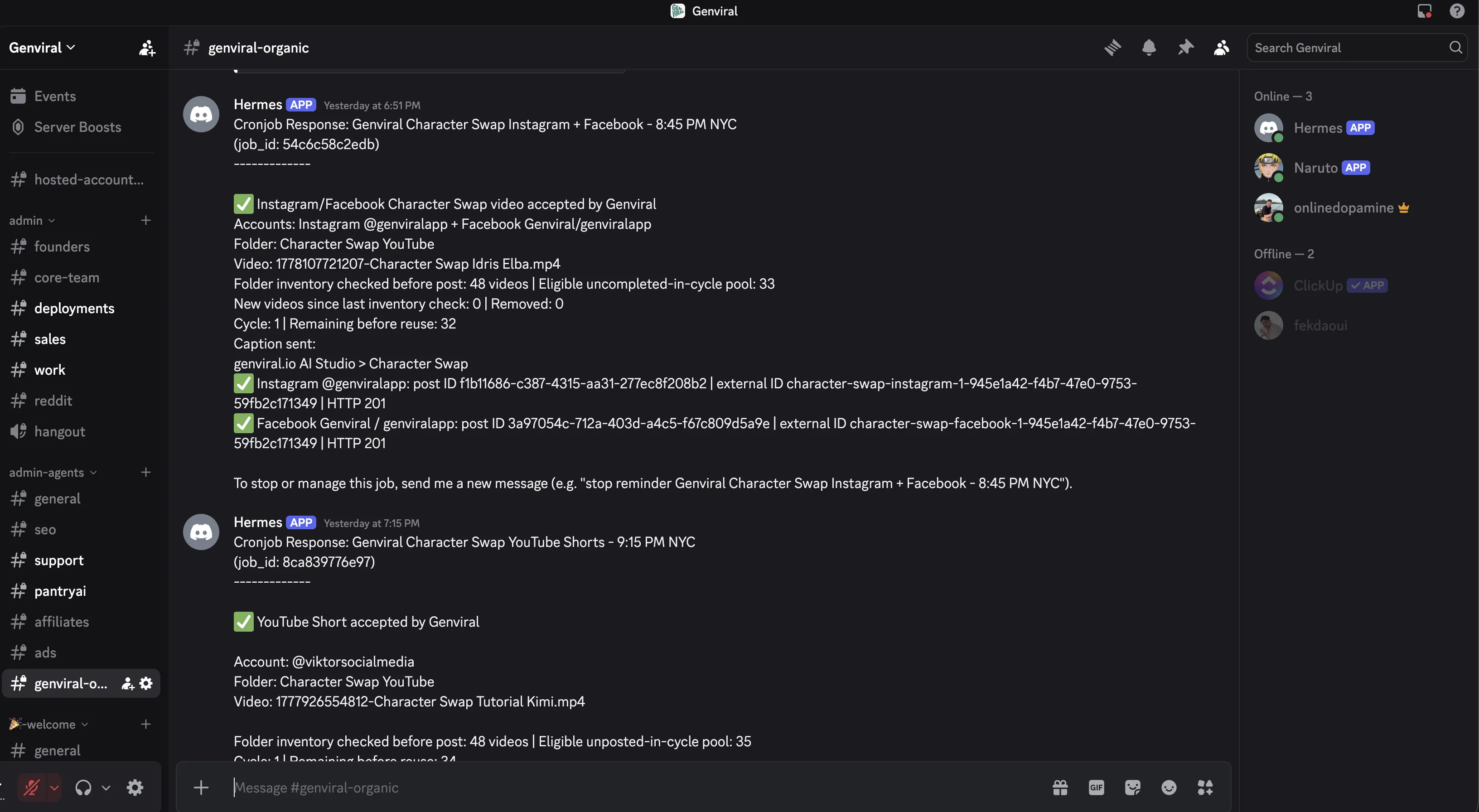
The example in the video runs in Discord, and that is a practical default because it gives you:
- a clear home channel for confirmations
- separate threads for different automations
- a simple place to collaborate with teammates
If you are already running Hermes elsewhere, that is fine too. The real requirement is operational clarity. One automation should have one home context.
Step 2: Feed Hermes the API Docs and API Key
Once Hermes is running, it needs the execution layer it will use.
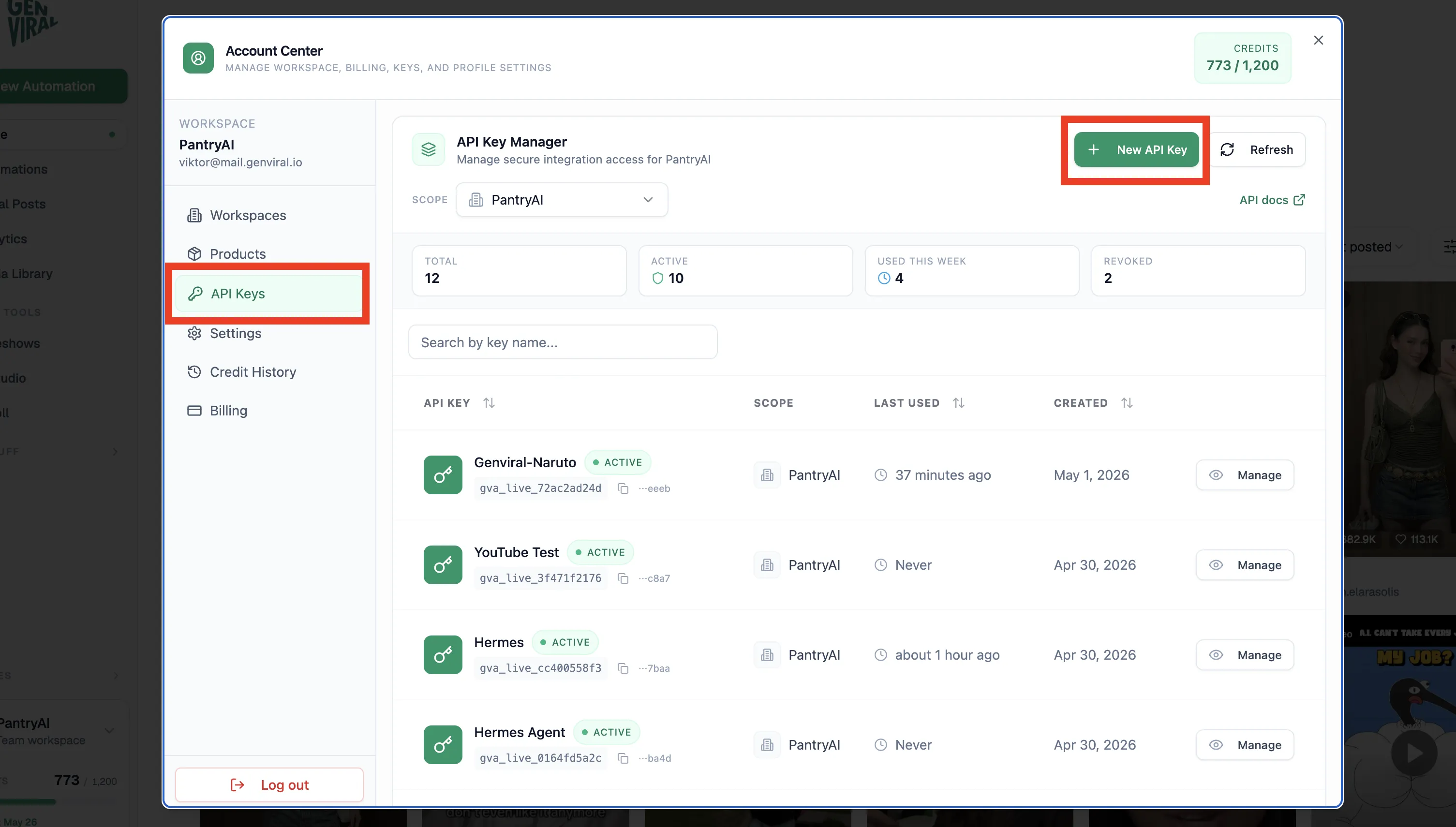
In this setup, that means giving Hermes:
- the Genviral API docs
- an API key from API Keys
That is what lets Hermes do real work instead of only describing the workflow abstractly. It can authenticate, inspect connected accounts, create posts, and use the rest of the content pipeline through one backend surface.
Step 3: Connect the Facebook Account Before Anything Else
Before Hermes can publish, the Facebook account needs to be connected manually.
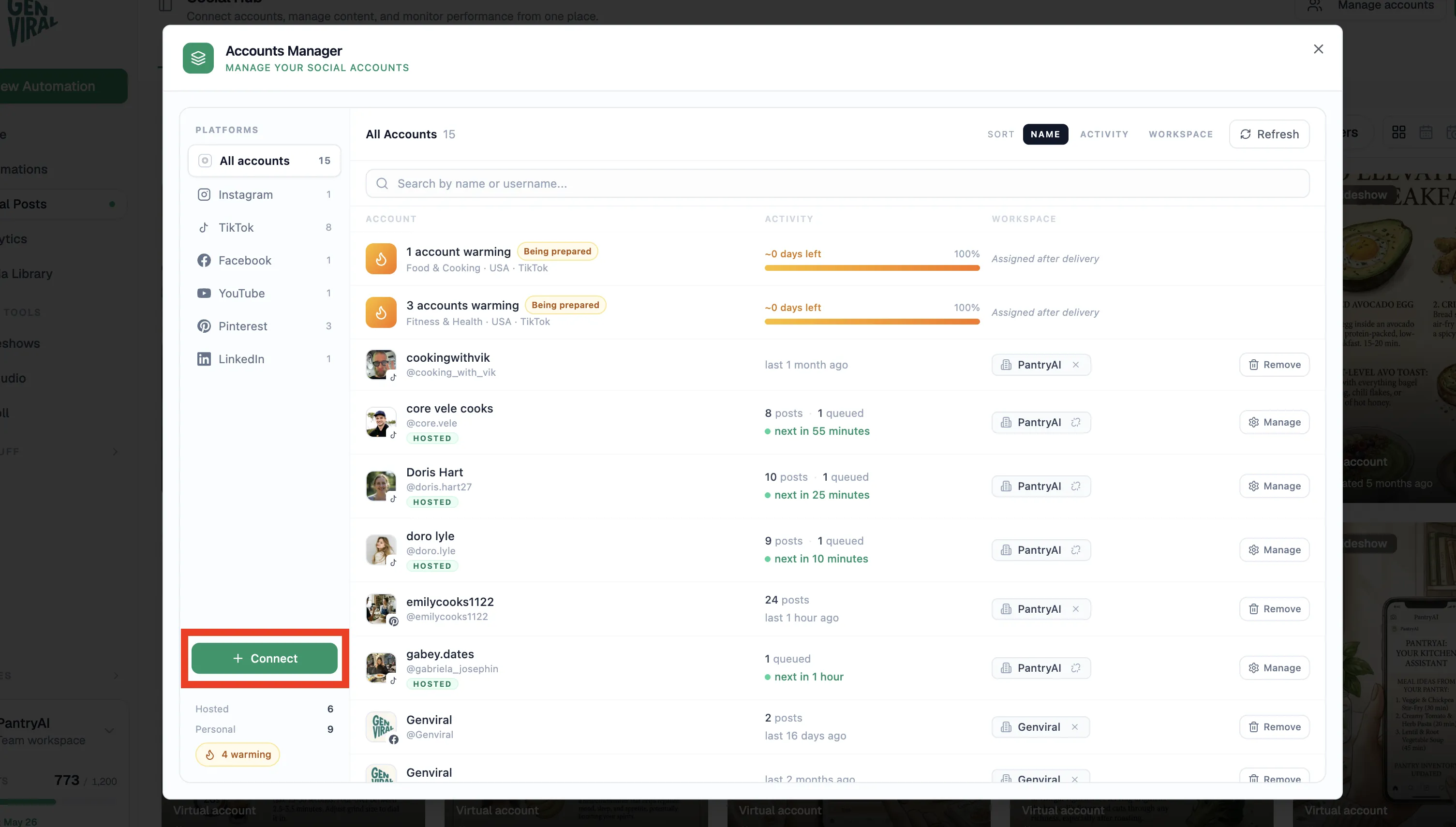
The flow is:
- open Social Posts
- go to Manage Accounts
- choose Facebook
- complete the connection flow
- ask Hermes to confirm it can see the account
That last step matters. Do not move on to cadence, captions, or folder rules until Hermes confirms the account is visible and usable.
If you want to review or manually manage what is queued later, Where to Find Scheduled Posts on Facebook is the best companion guide.
Step 4: Point Hermes at a Real Content Source
The transcript uses a folder of pre-made videos, which is one of the best ways to start.
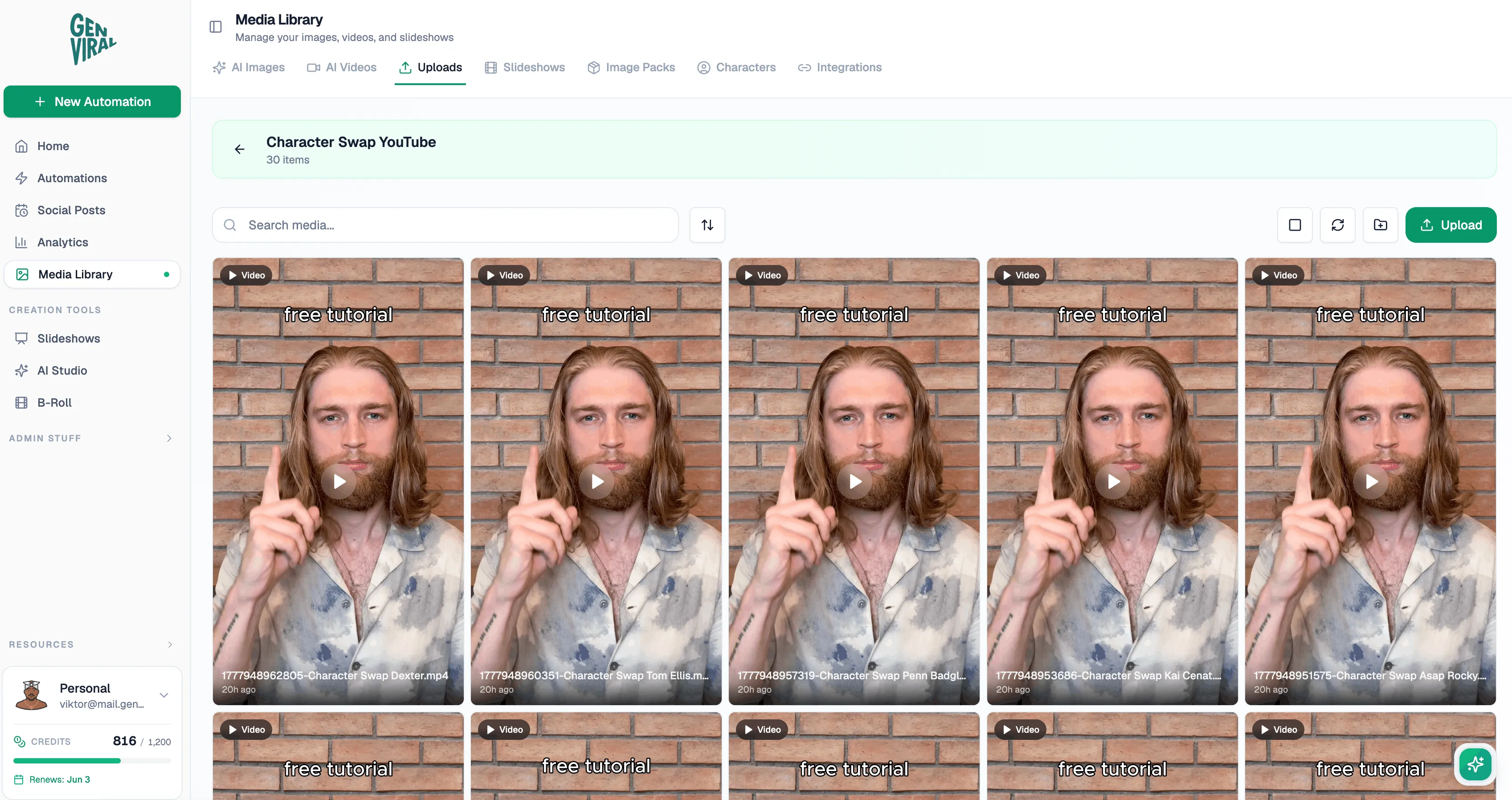
In that workflow:
- a human prepares the videos first
- new assets are uploaded into a dedicated folder
- Hermes confirms it can see that folder
- Hermes chooses from that inventory on each run
That is a better starting point than asking Hermes to invent the whole content system from scratch. If the assets already exist, the automation becomes much more stable.
This also makes cross-posting much easier. If the same videos are working across platforms, you can reuse that inventory for Instagram or YouTube Shorts without rebuilding the workflow from zero.
Step 5: Let Hermes Ask Clarifying Questions
One of the best recommendations in the transcript is to let Hermes guide the setup instead of dumping everything into a single prompt.
Ask Hermes to walk through the automation step by step and clarify things like:
- what time the Facebook post should go out
- whether the content should be video-only or mixed media
- what caption format should be used
- whether hashtags should be included
- where confirmations should be posted
- what to do when an account fails or a post cannot be published
This matters because missing one rule early creates a messy recurring automation later.
Step 6: Define the Cadence and Confirmation Rules Clearly
The concrete example in the transcript posts once per day at 8:45 p.m. New York City time and sends a confirmation back into a dedicated channel.
That is a strong pattern for Facebook because it gives you:
- predictable cadence
- a stable audit trail
- one place to inspect what ran
- one place to catch failures quickly
You should be explicit with Hermes about:
- the posting time
- the destination Facebook account
- the caption pattern
- whether hashtags are allowed
- whether the confirmation should include a post ID or run ID
If you want a more cautious starting point, you can also make Hermes create the first post for review before you fully automate it. If you prefer a draft-heavy workflow, How to Find Drafts on Facebook is useful for the manual-review side.
Step 7: Keep a Log So Hermes Does Not Repost Too Early
This is the single most important detail in the whole setup.
If you are posting from a finite folder of assets, Hermes needs a log that tells it:
- what has already been posted
- when it was posted
- what should be skipped next time
- when the content pool has actually been exhausted
In the example from the video, the log prevents Hermes from posting the same character-swap video again on the next run. That matters even more when you are running many automations at once. Each automation needs its own distinct memory of what it has already used.
Step 8: Have Hermes Monitor the Folder for New Media
The transcript also calls out another smart rule: keep monitoring the folder for newly added videos.
That way the workflow does not behave like a static list. Instead:
- Hermes knows the current folder inventory
- new uploads expand the available queue
- reposting becomes less likely because the pool keeps refreshing
This is especially helpful when your editor or content team is adding assets almost every day. Hermes does not need a whole new setup each time. It just needs permission to keep its understanding of the folder current.
Step 9: Plan for Reauthentication and Failure Reporting
One of the practical lessons in the transcript is that the Facebook automation stopped working because the account had not been used for a while and needed to be reconnected.
That is exactly why failed-post confirmations matter.
Hermes should tell you when:
- the Facebook account is no longer authenticated
- a required scope is missing
- the post failed to publish
- the folder could not be read
- the automation skipped a run for a real reason
That makes the system debuggable. Without this, an automation can quietly stop posting and nobody notices until days later.
The Biggest Facebook Lesson From This Workflow
The best recommendation in the video is still the same one that shows up across the other Hermes guides:
Run the workflow manually first.
Before you automate Facebook posting, learn:
- what type of Facebook content you actually want to publish
- what captions feel right for the page
- what cadence the page can sustain
- whether videos, graphics, or cross-posts work best
- how the connected account behaves in the product
Once that is clear, Hermes becomes a multiplier. Before that, it mostly automates uncertainty.
Getting Started
If you want to replicate the Facebook workflow from the video:
- set up Hermes in the interface where you want to manage the automation
- connect your Facebook account in Social Posts
- create an API key in API Keys
- feed Hermes the API docs and credentials
- show Hermes the exact folder it should use
- tell Hermes to ask clarifying questions before building the recurring job
- define the posting time, caption rules, and confirmation channel
- require a per-automation log of posted assets
- make Hermes report both successful and failed runs
- validate the first post before leaving the automation alone
If Facebook is only one part of your content distribution stack, the same overall model also extends naturally to TikTok, Instagram, and YouTube Shorts.
Related Guides
- Claude Facebook Automation with Claude Cowork
- Hermes Agent Social Media Automation
- Hermes Agent Social Media: How to Automate Posting
- How to Automate Facebook Posting with OpenClaw and Genviral
- How to Automate Instagram Posting with Hermes Agent
- How to Automate YouTube Shorts Posting with Hermes Agent
- How to Automate TikTok Posting with Hermes Agent
- Where to Find Scheduled Posts on Facebook
- How to Find Drafts on Facebook

Viktor
Occasional writer, sometimes even funny. Also loves to start conmpanies (weird, I know).


