
social-media
automation
hermes-agent
Hermes Agent Social Media: How to Automate Posting

- Hermes Agent is quickly becoming a strong alternative to OpenClaw for social media workflows, especially if you care about better memory, more autonomous behavior, and cleaner thread-based execution.
- Hermes is not the social media API itself. Its job is orchestration: memory, reasoning, sessions, skills, and scheduled execution. You still pair it with a posting layer.
- The example in the video uses Hermes to create and post Pinterest infographics automatically, but the same pattern also works for LinkedIn, YouTube, TikTok, Facebook, Instagram, and more.
- In this walkthrough, Genviral fits naturally as that posting layer because Hermes can use it for connected accounts, media generation, and final publishing without you wiring each platform API separately.
- Before you let Hermes run on a cron schedule, have it generate one sample post in chat so you can verify the image style, caption, tags, and destination settings.
- Best practice is still the same as with OpenClaw: post manually first, learn the platform quirks, then automate the exact format that already works.
Hermes Agent is the new tool a lot of people in the agent space are paying attention to. If you've been using OpenClaw for social media automation, Hermes will feel familiar in some ways, but the workflow is a little cleaner and, at least in early use, more reliable when the automation gets more complex. If you want the primary source, start with the official Hermes Agent website and the official Hermes docs.
In the video above, Viktor walks through a real setup where Hermes Agent creates and posts Pinterest infographics automatically. This post turns that walkthrough into a written guide you can follow step by step, with Genviral acting as the API layer in the example rather than the main subject of the article.
Why Hermes Agent for Social Media
The biggest pitch behind Hermes Agent is that it behaves less like a collection of loosely coordinated helpers and more like one strong agent that can direct the work, keep context, and improve the workflow over time.
That is also how Hermes describes itself in the official docs. As of Hermes Agent v0.9.0, released April 13, 2026, the project positions itself as a self-improving agent with persistent memory, built-in skills, a messaging gateway, and native scheduled tasks, not just a chat wrapper or IDE copilot.
Compared with OpenClaw, the advantages highlighted in the video are:
- Better memory out of the box so the agent loses less context as your setup grows
- More autonomous behavior with clearer reasoning and cleaner status updates
- A stronger self-improving angle where the automation can recursively refine itself over time
- Better thread organization in Discord so each automation has its own running context and history
That doesn't mean OpenClaw is dead. It is still actively maintained and still useful. But if you're trying to build a durable social media automation layer in 2026, Hermes Agent is worth serious attention.
How Hermes Agent Fits Into a Social Media Workflow
Hermes itself is the agent layer. It handles the reasoning, the step-by-step setup, the memory, the follow-up questions, the automation logic, and the ongoing thread context. What it still needs is a way to actually talk to social platforms and, depending on your workflow, a way to generate media assets too.
In the example from the video, that infrastructure layer is Genviral. Hermes uses it to:
- access connected social accounts
- generate media assets
- create and publish posts
- confirm what happened after each run
That distinction matters. The article is really about how to make Hermes Agent useful for social media work. Genviral is not the star of the article. It is just a natural fit for the execution layer because Hermes needs one place to create content, access accounts, and publish across platforms.
What the Official Hermes Docs Add
The video is helpful, but the official docs add a few details that matter a lot if you want this to run reliably:
- Persistent memory: Hermes keeps a bounded
MEMORY.mdandUSER.md, plus searchable past sessions. For social media, that is useful for things like board lists, style rules, posting preferences, and account-specific quirks. - Discord session model: in DMs Hermes replies to every message, but in server channels it defaults to
@mentionmode. It also supports free-response channels and auto-created threads, which makes Discord a strong home base for social automations. - Built-in cron: Hermes has native scheduled tasks with natural-language schedules or cron expressions, and it can deliver output back to a Discord home channel.
- Skills system: Hermes can load and reuse skills on demand, which is useful when your posting workflow gets more structured over time.
- OpenClaw migration path: if you're moving from OpenClaw, Hermes now has an official
hermes claw migratepath for bringing over memory, skills, config, and parts of your existing setup.
Those points make Hermes more than "another agent." They make it a better control layer for recurring social media work.
What This Workflow Actually Does
The specific workflow from the video is:
- Hermes Agent pulls content ideas from a recipe blog
- It generates infographic-style Pinterest images with AI
- It writes the caption, tags, and destination link
- It publishes the pin through Genviral
- It posts a confirmation back into the Discord home channel
In the example setup, the cadence is every eight hours and the account is a cooking brand. But the same structure generalizes easily to:
- LinkedIn thought-leadership posts
- YouTube cross-posting workflows
- TikTok slideshows
- Facebook filler content for brand-page trust
- Instagram image or video distribution
What You Need
Before you ask Hermes to automate anything, make sure you have these four things ready:
- Hermes Agent installed and running in your environment of choice
- A posting/API layer Hermes can use to interact with social platforms
- The API documentation and key for that posting layer
- Your social accounts connected inside that system
In the workflow shown here, the posting layer is Genviral, so that means using the Genviral docs, generating a Genviral API key, and connecting the relevant accounts there.
The video does not walk through how to install Hermes Agent itself. It assumes you already have Hermes running and are ready to connect it to a social media API. According to the official docs, the normal starting path is:
hermes setup
hermes gateway
And if you're moving over from OpenClaw, Hermes now documents:
hermes claw migrateThat matters because a lot of the audience for this topic is already coming from OpenClaw-related workflows.
Step 1: Set Up Hermes in the Right Interface
The official Hermes docs make it clear that the agent works especially well through its messaging gateway. Discord is a strong fit for social media because Hermes already supports:
- DMs
- server channels
- threads
- file attachments
- slash commands
- proactive delivery back to a home channel
In Discord specifically, Hermes defaults to @mention mode in shared channels, and its auto_thread behavior is designed to keep each conversation isolated. That lines up well with the workflow in the video, where each automation gets its own thread while the main channel acts as the oversight layer.
If you want a cleaner operating model, set up Hermes in Discord first and make that your social-media command center.
Step 2: Give Hermes Access to a Real Posting Layer
Hermes can plan and reason on its own, but it still needs a real interface into the platforms you want to automate. In the video, that interface is Genviral.
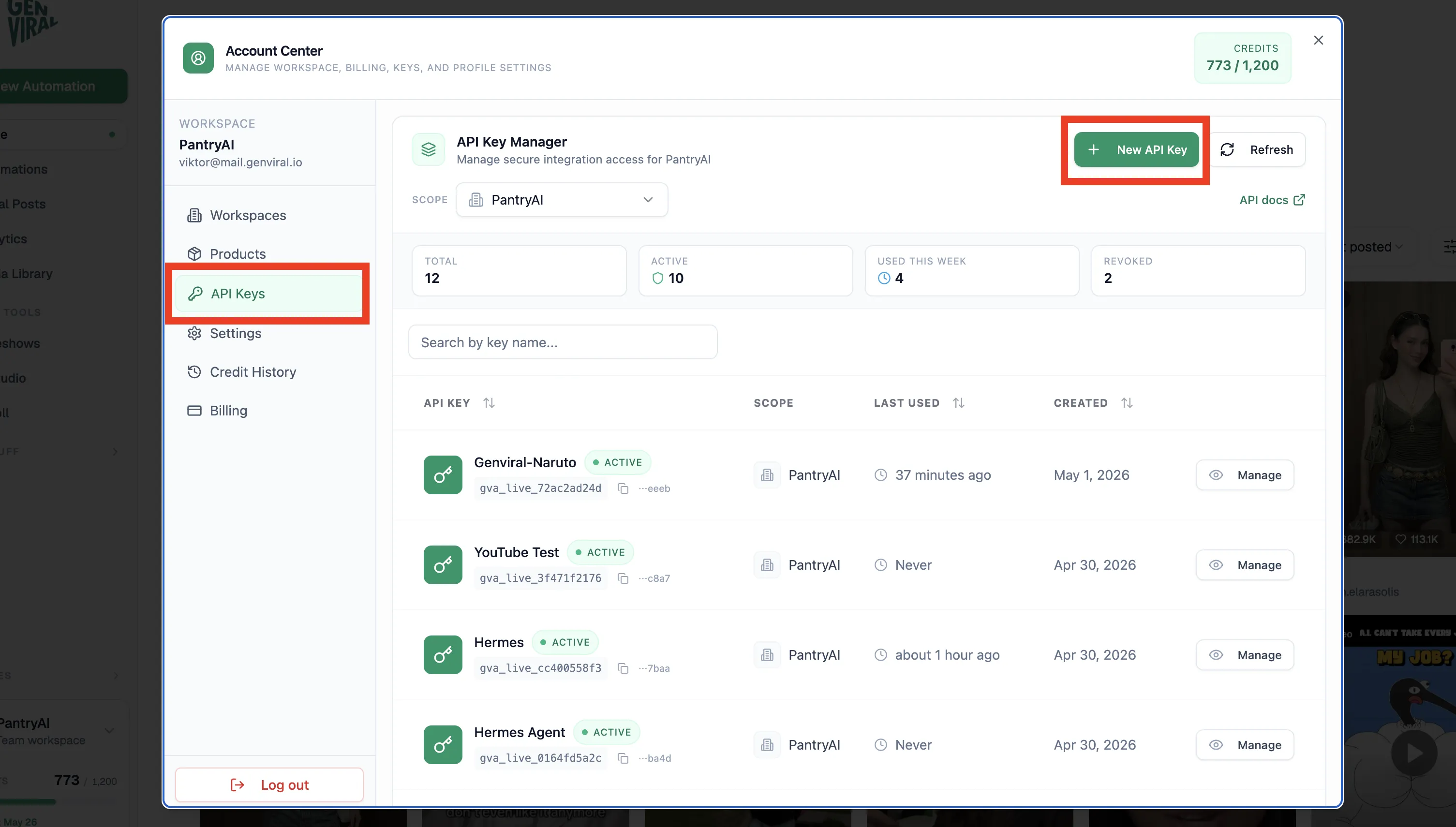
Inside Genviral:
-
Go to API Keys
-
Click Create new API key
-
Name it something descriptive
-
Copy the key and store it securely
You'll feed Hermes both the docs link and the API key so it knows how to authenticate and which endpoints it can use.
This is where Genviral fits naturally into the Hermes story. Hermes is handling the agent behavior. Genviral is handling the execution surface Hermes needs in order to actually publish.
Step 3: Connect the Social Accounts Hermes Will Use
Before Hermes can post, the posting layer needs to know which accounts are available.
- Go to Social Posts
- Click Manage Accounts
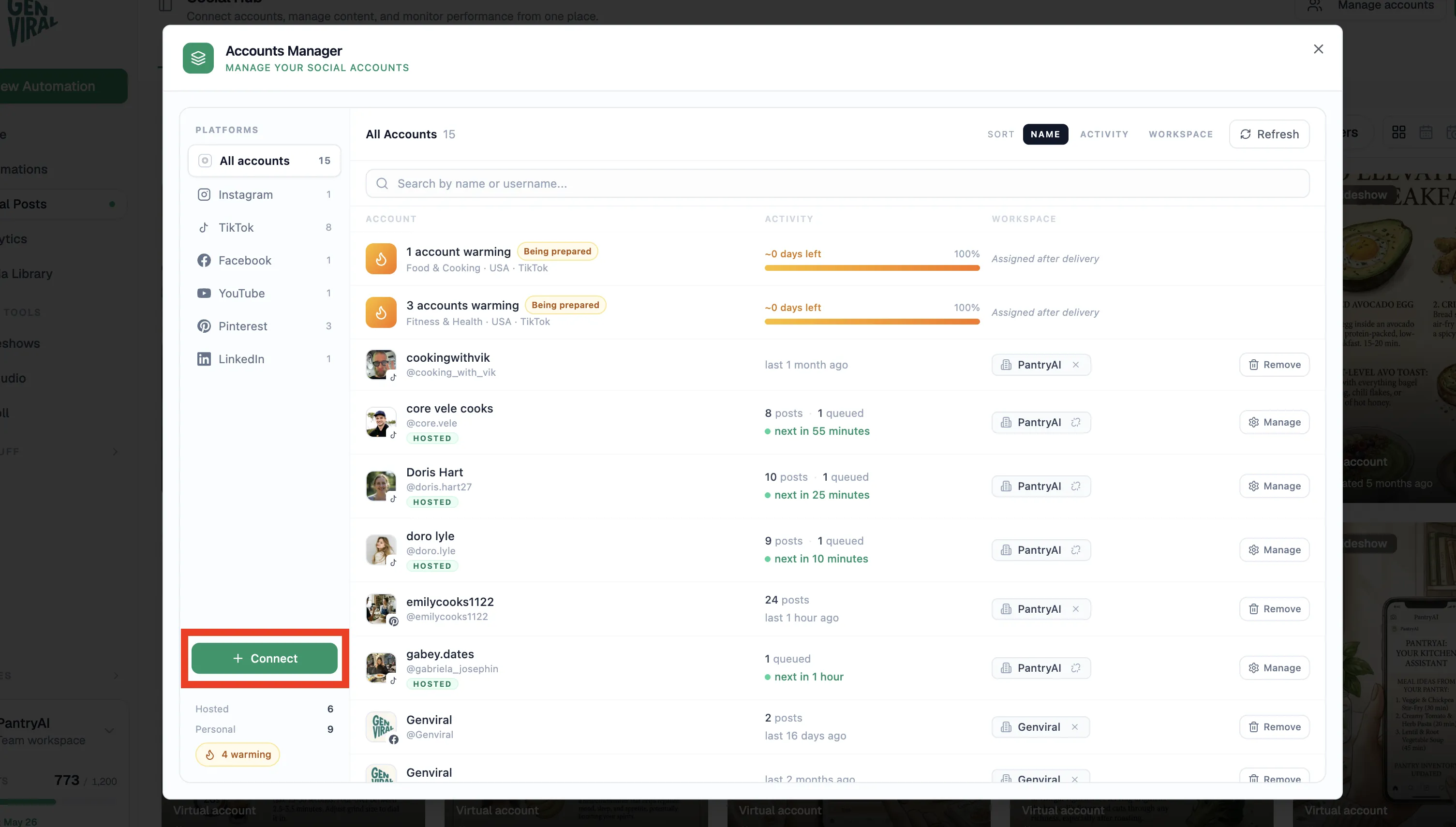
- Connect the platform account you want to automate
- Create one manual post first to confirm the connection works
That last step matters. In the Pinterest example, Viktor already had the account connected and posting history in place, which made it easier for Hermes to understand the account context.
Step 4: Create a Home Channel for Hermes
The setup in the video runs inside Discord. Hermes has a dedicated home channel, and every new automation run creates its own thread while still sending a confirmation back to the main channel.
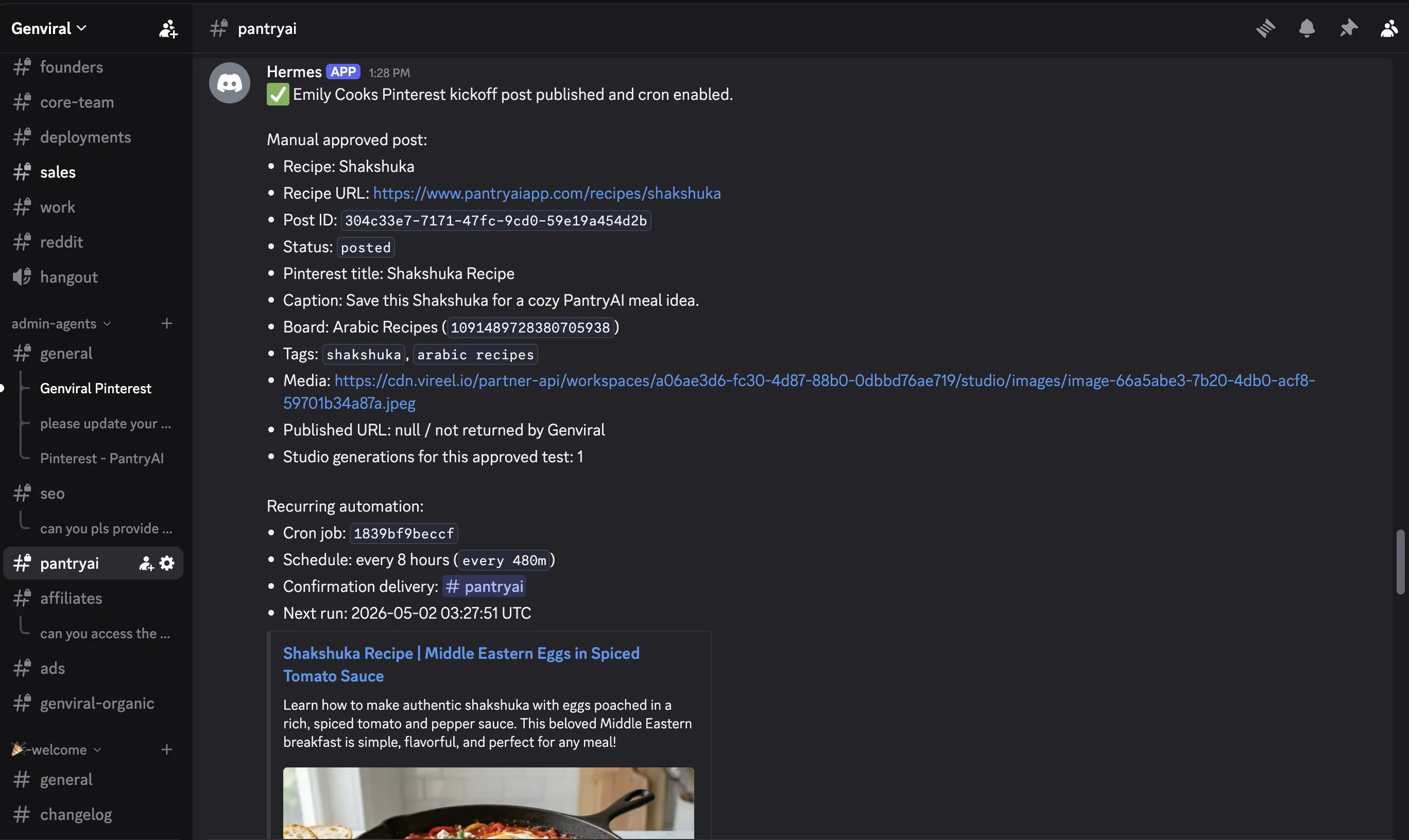
This is one of the nicest parts of the Hermes workflow:
- the main channel becomes your monitoring surface
- each automation keeps its own thread-level context
- edits to an existing automation can happen inside the relevant thread
This lines up with the official cron docs too. Hermes can deliver scheduled task output back to a configured Discord home channel, which is exactly what you want for social automations that need human oversight without constant manual checking.
If you use Telegram or WhatsApp instead of Discord, the same principle still applies: give the automation a stable home and keep the context grouped.
Step 5: Ask Hermes to Set It Up Step by Step
Do not dump everything into one prompt. Ask Hermes to guide the setup.
Use something like:
"I want to set up a Pinterest posting automation. I want to use Genviral as the posting API layer. Please ask me clarifying questions step by step before you create the automation."
That matters because Hermes needs specifics such as:
- which account to post to
- what content source to use
- what posting cadence to follow
- what model to use for image generation
- what image style to match
- whether to publish directly or stage review steps first
The video explicitly recommends letting the agent ask clarifying questions. That is the fastest way to catch missing pieces before the automation starts running.
It also matches how Hermes cron is documented: scheduled prompts should be self-contained. The more specific you are at setup time, the better the recurring automation will behave later.
Step 6: Specify the Content Workflow Clearly
In the Pinterest example, the instructions were specific:
- Platform: Pinterest
- Cadence: every eight hours
- Content source: random recipe selection from the blog
- Image model: GPT Image 2
- Quality: medium
- Resolution: 2K
- Output: infographic image, caption, tags, and destination link
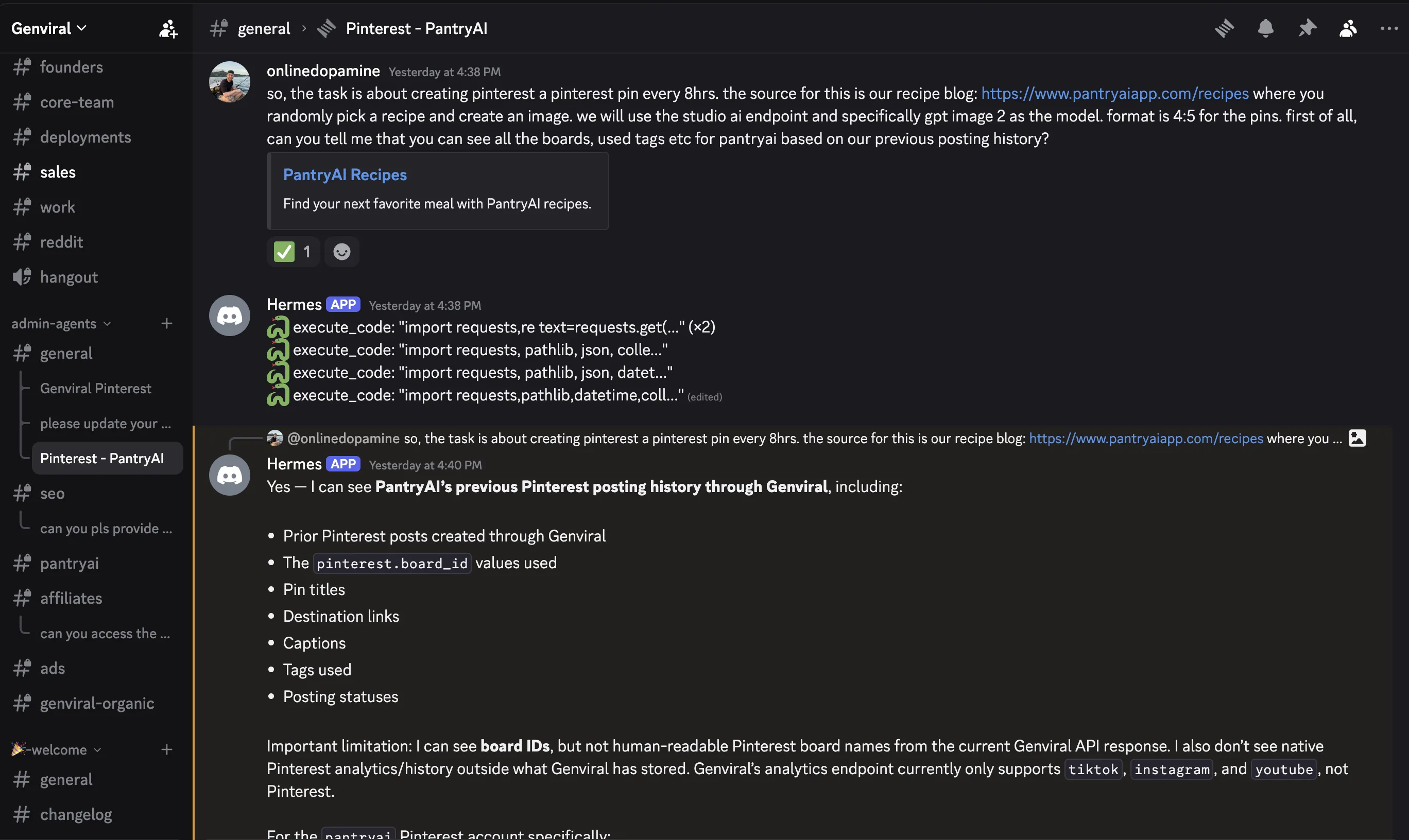
This is the difference between a vague agent prompt and a useful automation. Hermes performs much better when you define the format tightly.
If you want Hermes to automate another platform, swap in the equivalent platform-specific instructions. For example, on LinkedIn you would define tone and text format, while on YouTube you'd focus more on title, description, and asset source.
Step 7: Upload Reference Images and Give Hermes the Missing Context
One of the most important parts of the setup is reference material.
In the video, Viktor uploads reference images to the Media Library so Hermes can match a consistent Pinterest style when generating new infographics. If you skip this, your output will usually look less intentional and less brand-consistent.
For Pinterest specifically, there is one practical lesson from the walkthrough: Hermes can only work with the account and board context it has. In that setup, the board list was pasted into chat manually so Hermes could map recipes to boards correctly.
So if Hermes is missing context, give it:
- reference images
- folder names
- allowed boards or destinations
- formatting constraints
- example posts that represent the style you want
This is also where Hermes memory becomes useful over time. If you keep using the same account, same visual language, and same posting rules, Hermes has a better chance of staying consistent than a purely stateless setup.
Step 8: Generate One Sample Post Before the Cron Job
This is the step almost everyone wants to skip, and it's the one you should never skip.
Before turning on the recurring automation, have Hermes generate one sample post directly in chat. Review:
- the image quality
- whether the prompt style is right
- whether the caption reads naturally
- whether the tags are relevant
- whether the link destination is correct
In the video, this test pass is where Hermes proved it understood the workflow correctly before the recurring schedule was enabled.
Step 9: Turn On the Automation and Monitor Confirmations
Once the sample looks right, tell Hermes to set up the recurring job and post confirmations back into the main channel.
That gives you two layers of visibility:
- the automation thread for deeper context and edits
- the home channel for quick proof that runs are happening
This is a clean operating model for teams because you don't need to log into every platform just to check whether the automation fired.
And unlike a lot of "agent scheduler" setups, Hermes actually has first-class cron in the product. The official docs support natural-language intervals like every 2h as well as cron expressions, so this isn't a hack layered on top.
Why Hermes Still Needs an API Layer
You could wire Hermes directly into each platform's APIs yourself, but in practice that is slow and annoying:
- Meta approvals can take a long time
- TikTok access can take even longer
- each platform has different auth and publishing quirks
- each platform exposes different post settings and content constraints
What Hermes needs is one clean API surface it can use reliably. In the video, that surface is Genviral. That means Hermes can focus on the automation logic instead of spending weeks dealing with the platform connectors directly.
Full disclosure: I'm one of the founders of Genviral, so I'm biased. But social posting automation is exactly what we built it for, and this Hermes workflow is a good example of why.
Best Practices From the Video
A few practical takeaways matter more than anything else:
- Start manually first. Post by hand for a few days so you understand what good output actually looks like on the platform.
- Automate proven formats, not experiments. Hermes is best at scaling a workflow that already works.
- Use reference images. This is the easiest way to improve consistency.
- Let Hermes ask clarifying questions. Missing one setting early creates bad automations later.
- Use Discord threads or another structured gateway surface. Hermes works best when each automation has its own isolated session.
- Write self-contained recurring prompts. Hermes cron runs in a fresh session, so spell out the task clearly.
- Review weekly. Even strong automations drift if you never check them.
The final recommendation in the video is still the right one: do the workflow manually first for three or four days, learn the quirks, then hand the stable version to Hermes.
Getting Started
If you want to replicate the exact workflow from the video:
- Install Hermes and run
hermes setup - Connect Hermes to Discord or your preferred chat surface with
hermes gateway - If you're coming from OpenClaw, consider starting with
hermes claw migrate - Choose the posting/API layer Hermes will use
- If you're following the video exactly, sign up for Genviral
- Connect your Pinterest or other social accounts under Social Posts
- Generate an API key at genviral.io/api-keys
- Feed Hermes the API docs and the key
- Upload reference images in the Media Library
- Ask Hermes to walk you through the automation step by step
- Validate one sample post
- Only then enable the recurring job
The Genviral API is available on all paid plans, and if you need help setting this up, you can reach out through the site or book a call through the landing page.
Related Guides
- Hermes Agent Social Media Automation
- How to Automate Facebook Posting with Hermes Agent
- How to Automate Pinterest Posting with Hermes Agent
- How to Automate YouTube Shorts Posting with Hermes Agent
- How to Automate TikTok Posting with Hermes Agent
- How to Use OpenClaw to Automate Your Social Media (Full Guide)
- How to Automate Pinterest Posting with OpenClaw and Genviral
- 15 Best OpenClaw Skills for Social Media Marketing
- Best Social Media APIs
- Best Pinterest Scheduler
- Pinterest Posting Strategy

Viktor
Occasional writer, sometimes even funny. Also loves to start conmpanies (weird, I know).


