
automation
hermes-agent
How to Automate Instagram Posting with Hermes Agent

- Hermes Agent works well for Instagram social media automation because it can manage the setup conversation, confirm prerequisites, and then run a recurring posting workflow with minimal supervision.
- The Instagram example in this walkthrough uses Genviral's API docs as the publishing layer, so Hermes can authenticate, access connected accounts, pull media from folders, and publish through one API surface.
- Before you do anything else, you need an active Genviral subscription, because you need both the connected social-account layer and the API key that Hermes will use.
- Hermes can automate several different Instagram workflows: reels from existing videos, carousels from generated images, slideshow-style educational posts, or cross-posted assets from other channels. The transcript uses pre-edited videos as a simple example, not as the only supported path.
- One of the most important parts of the setup is the internal log system so Hermes knows which videos have already been used.
- Always have Hermes send post confirmations, including failed-post confirmations, back into your main channel so you can intervene quickly when an account needs reauthentication or a job misfires.
Instagram is one of the cleaner places to use Hermes Agent for social media automation because the workflow can be very structured. Hermes can work with pre-made media, generated assets, carousels, reels, or cross-posted content. What matters is that you give it clear rules, the right account access, a stable content source, and a schedule it can follow.
The setup in this guide uses a video workflow because that is what the transcript focuses on, but the same principles apply more broadly to Instagram automation. Hermes acts as the orchestration layer, while Genviral handles the account connection and publishing.
If you already use Claude, the companion Claude Instagram automation guide shows the connector setup and the path from one reviewed post to a recurring Claude Cowork task.
What This Instagram Automation Actually Does
The transcript's concrete example is a very specific automation:
- pre-edited videos are stored in a media-library folder
- Hermes checks the connected Instagram account
- it picks the next unused video
- it applies a fixed title/caption pattern with a few relevant hashtags
- it publishes the post once per day
- it sends a confirmation back into the channel
That is important because it shows the real value of Hermes for social media: you do not need to automate every part of the content pipeline. Sometimes the best automation is to let a human prepare the media, then let Hermes handle the repetitive publishing logic. But you can also use the same setup model for more dynamic Instagram workflows.
Other Instagram Automations You Can Run with Hermes
Do not read this guide as "Hermes only works for pre-made videos." Hermes can also be used to automate:
- reels from existing video folders
- carousel posts from generated or existing images
- AI-generated image posts through Studio AI
- slideshow-style educational posts
- cross-posting from a shared content pool to Instagram, Facebook, YouTube, or TikTok
- analytics-informed iteration where Hermes improves the workflow based on the data it gets back
So the example here is intentionally simple, but the setup principles are broader than the example itself.
Why Hermes Agent Makes Sense for Instagram
Instagram automations usually fail in one of three places:
- the account is not actually connected or later loses authentication
- the content source is vague or inconsistent
- the system reposts old content because it has no memory of what already ran
Hermes is useful here because it can:
- verify that the account exists and is in a usable state
- follow explicit instructions about captions, hashtags, and cadence
- keep an internal log system for used assets
- send back confirmations so you can monitor the workflow
That is a much better fit than treating Instagram as a blind "publish at 8pm" scheduler.
What You Need
Before you ask Hermes to automate Instagram posting, make sure you have:
- Hermes Agent already installed and running in your preferred interface
- an Instagram publishing layer Hermes can use
- an active Genviral subscription
- an API key for that layer from Genviral API Keys
- your Instagram account connected in Social Posts
In this walkthrough, Genviral is the natural backend because it gives Hermes one way to authenticate, query accounts, pull media from folders, and publish across multiple social platforms if needed.
Step 1: Choose Where Hermes Will Run
The first decision is not Instagram-specific. It is where the automation should live.
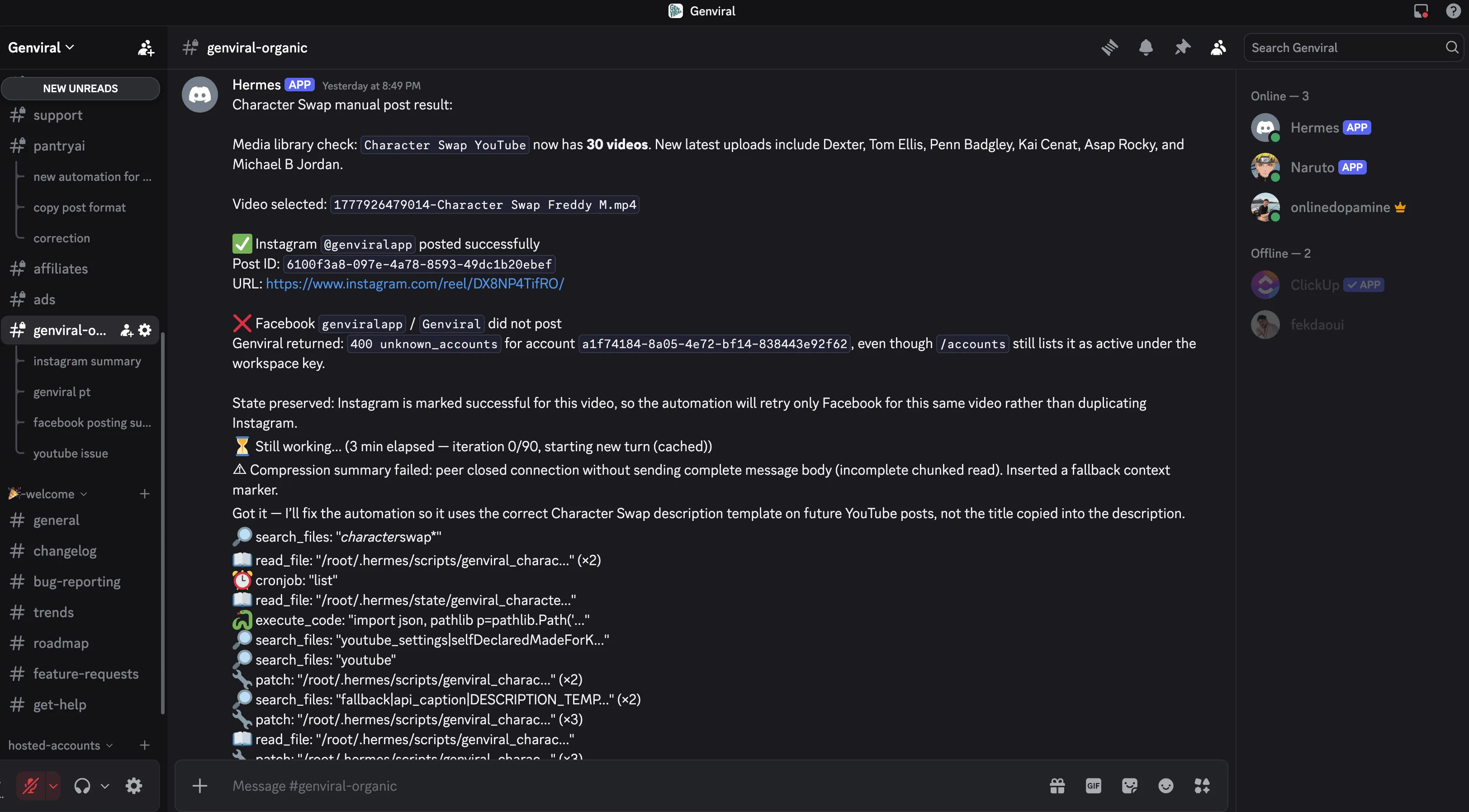
I recommend choosing the place where you already monitor other automations. Discord works well for this, but Telegram, Microsoft Teams, WhatsApp, and similar interfaces can work too. The important part is that Hermes already has a functioning home before you start the Instagram setup.
This video assumes Hermes is already installed and running. It does not cover Hermes setup itself.
Step 2: Feed Hermes the API Docs and API Key
Once Hermes is up, the next requirement is the API surface it will use.
In this workflow, that means giving Hermes:
- the Genviral API reference
- an API key from Genviral API Keys so it can authenticate
That key is what allows Hermes to act on your behalf instead of just planning the workflow abstractly.
Step 3: Connect the Instagram Account First
Before Hermes can post anything, the Instagram account needs to be connected manually.
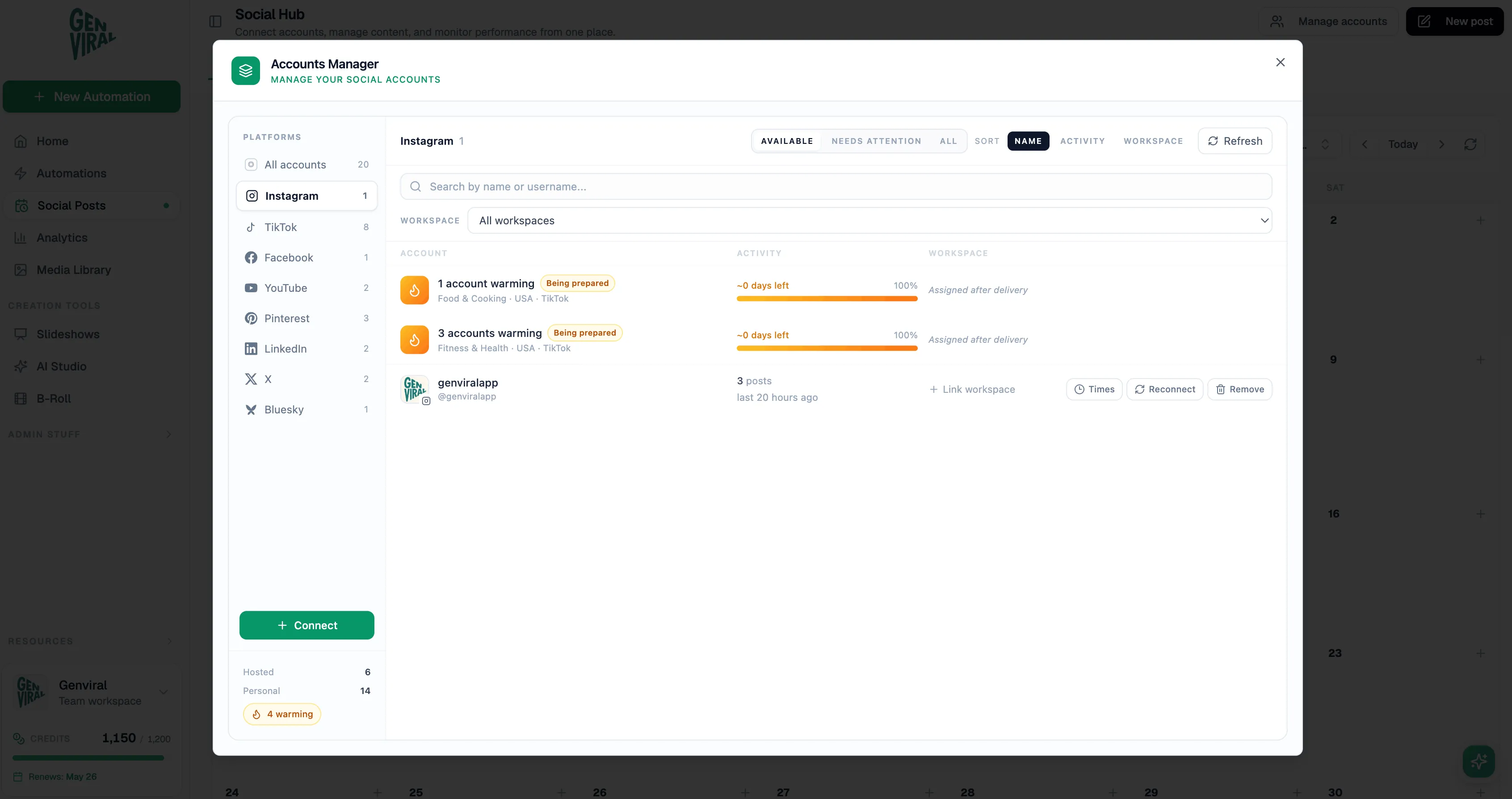
The basic flow is:
- go to Social Posts
- open Manage Accounts
- choose Instagram
- complete the authentication flow
Only after that should Hermes be asked to confirm the account status. Test this in chat first: ask Hermes whether it can see the account and whether the account is in a usable state before you move on.
That early confirmation saves a lot of debugging later.
Step 4: Decide What Kind of Instagram Automation You Actually Want
This process works across major social platforms, but the exact setup depends on the automation.
For Instagram, Hermes can be used to:
- post carousel images
- post reels or regular videos
- generate images through Studio AI
- pick existing images or videos from folders
- cross-post assets that were already created for YouTube or Facebook
In the transcript's example workflow, the content is not generated from scratch every day. Instead, Hermes pulls from a folder of ready-made videos and publishes them on schedule.
That is often a good place to start because it reduces moving parts. But if your best Instagram workflow is more image-driven or carousel-driven, you can also have Hermes generate the content instead of only selecting it.
Step 5: Use a Folder-Based Media Workflow
This is one practical content-source pattern, not the only one.
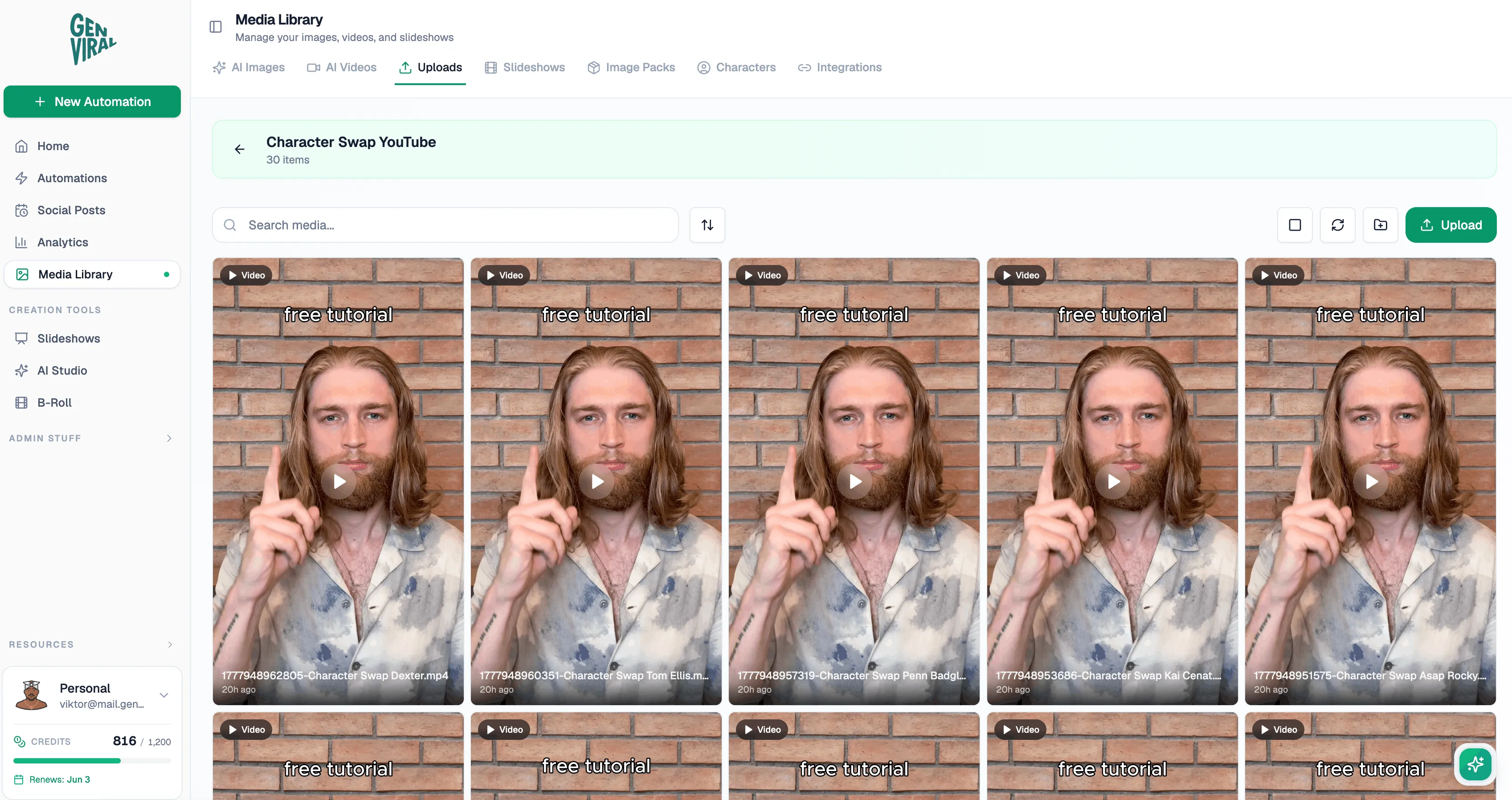
You should store your finished videos in a dedicated media-library folder. In this kind of setup, the videos can be edited in CapCut or another editor first, then dropped into the folder so Hermes can pick from them later.
In that setup, Hermes is responsible for:
- finding the next asset
- deciding whether it has already been used
- applying the right metadata
- posting it to Instagram
But Hermes is not responsible for editing the source videos.
That separation makes the automation much more stable. If you are starting with reels or short videos, I recommend beginning here before adding more moving pieces.
Step 6: Give Hermes Clear Posting Rules
Once your chosen content source is in place, Hermes still needs explicit instructions.
Those instructions should include:
- always use a specific title format
- always use a specific caption structure
- include two to three relevant hashtags
- keep an internal log so the same video is not reposted immediately
This is one of the most important practical details in the whole setup. The lock system matters because any finite content source can run dry. If you do not explicitly tell Hermes how to track used assets, repeated posting becomes very likely.
A good setup looks like this:
- Hermes remembers which videos have already been posted
- new videos are added to the folder over time
- only when the folder is exhausted does reposting become acceptable
That is exactly how an Instagram automation should think about inventory.
Step 7: Cross-Posting Is a Natural Next Step
The same source can also be used for more than one platform. For example, you can prepare the videos once, then route them to Instagram, YouTube, and Facebook. The same principle also applies to image sets and carousels if those formats fit multiple channels.
This is where Genviral fits very naturally into the story. Hermes does not need separate publishing logic for each platform. It can use one backend, one API surface, and one asset source while still sending the content to different social accounts.
If your media works across multiple platforms, this is one of the easiest ways to get more mileage out of the same content.
Step 8: Send Confirmations for Every Post
This is probably the most important operational recommendation in the entire walkthrough.
When Hermes finishes a post, it should send a confirmation back into your main channel. And if a post fails, it should still send the failure confirmation.
That is how you catch issues like account reauthentication problems early. Without the confirmation loop, the automation can look healthy until you notice missing posts manually.
For Instagram, that same principle applies. Confirmations give you:
- proof that the post ran
- a chance to inspect the output
- a fast signal when account auth breaks
- a way to intervene before multiple scheduled runs are lost
And if you later add analytics into the workflow, those confirmations become even more useful because they give you both operational visibility and content feedback.
The Biggest Lesson From This Workflow
The most useful recommendation here is the same one that shows up in the other Hermes guides:
Use the platform manually first.
Before automating Instagram, spend time posting manually so you understand:
- what good Instagram content looks like for your niche
- how your captions should read
- what hashtags are worth using
- what content format actually fits the account
- whether your strongest format is reels, carousels, static images, or something else
Once you understand the workflow end to end, Hermes becomes a multiplier. Before that, it mostly automates uncertainty.
Getting Started
If you want to replicate the Instagram workflow from the video:
- set up Hermes in the interface where you want to manage the automation
- make sure you have an active Genviral subscription
- connect your Instagram account in Social Posts
- generate an API key in Genviral API Keys
- feed Hermes the API docs and credentials
- decide whether the automation will use folders, Studio AI, slideshows, or another asset source
- define your caption/title/hashtag rules
- tell Hermes to track which videos have already been posted
- send one sample or test post first
- only then enable the recurring daily automation
If you need the execution layer for that workflow, you can start with Genviral, then let Hermes operate on top of it.
Related Guides
- How to Connect Claude to Instagram and Automate Posting
- Hermes Agent Social Media Automation
- How to Automate Facebook Posting with Hermes Agent
- How to Automate Instagram Posting with OpenClaw and Genviral
- Hermes Agent Social Media: How to Automate Posting
- How to Automate TikTok Posting with Hermes Agent
- How to Use OpenClaw to Automate Your Social Media
- Best Social Media APIs

Fekri
Builder, founder, father



