
social-media
tiktok
tutorial
How to Turn Off Profile Views on TikTok (2026 Guide)

- To turn off profile views on TikTok from your profile, tap the Viewers icon, tap the gear icon, then toggle Viewer history off.
- You can also go through Profile -> Menu (three lines) -> Settings and privacy -> Privacy, scroll to Viewers, then turn Viewer history off.
- When the setting is off, you cannot see who viewed your profile, and other eligible users should not see you in their Profile view history. It does not hide video views, likes, comments, follows, or messages.
TikTok's Profile view history feature is useful when you want to know who is checking your page. It is less fun when you are the one casually checking someone else's page and suddenly realize your visit may be visible too.
Here is the short version: turn off Profile view history before browsing profiles you do not want to appear on. If it was already on, assume your visit may have been visible if the other person also had the feature enabled.
Quick Answer
Open TikTok on your phone, then go to:
Method 1: Profile -> Viewers icon -> gear icon -> Viewer history -> Off
Method 2: Profile -> Menu (three lines) -> Settings and privacy -> Privacy -> Viewers -> Viewer history -> Off
There does not appear to be a reliable desktop/PC path for this setting. Use the TikTok mobile app.
TikTok has an official Help Center page for Profile view history. The important privacy trade-off is simple: profile views are reciprocal. If you want to see who viewed you, you have to allow eligible people to see when you viewed them.
Method 1: Turn Off Profile Views From Your Profile
This is the fastest path if the Viewers icon is visible on your profile.
-
Open the TikTok app.
-
Tap Profile in the bottom-right corner.
-
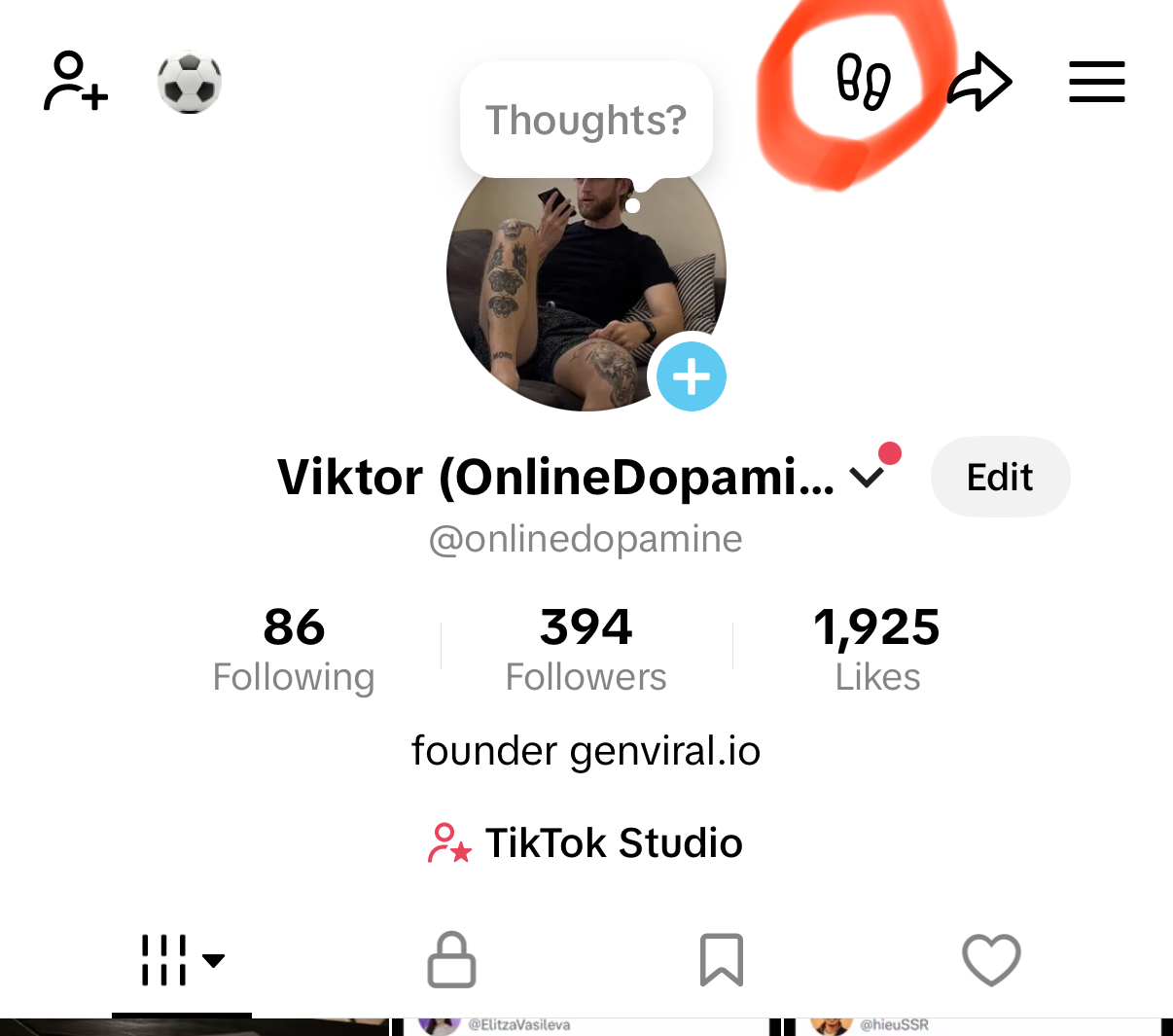
Tap the Viewers icon near the top-right of your profile. It looks like small footprints.
-
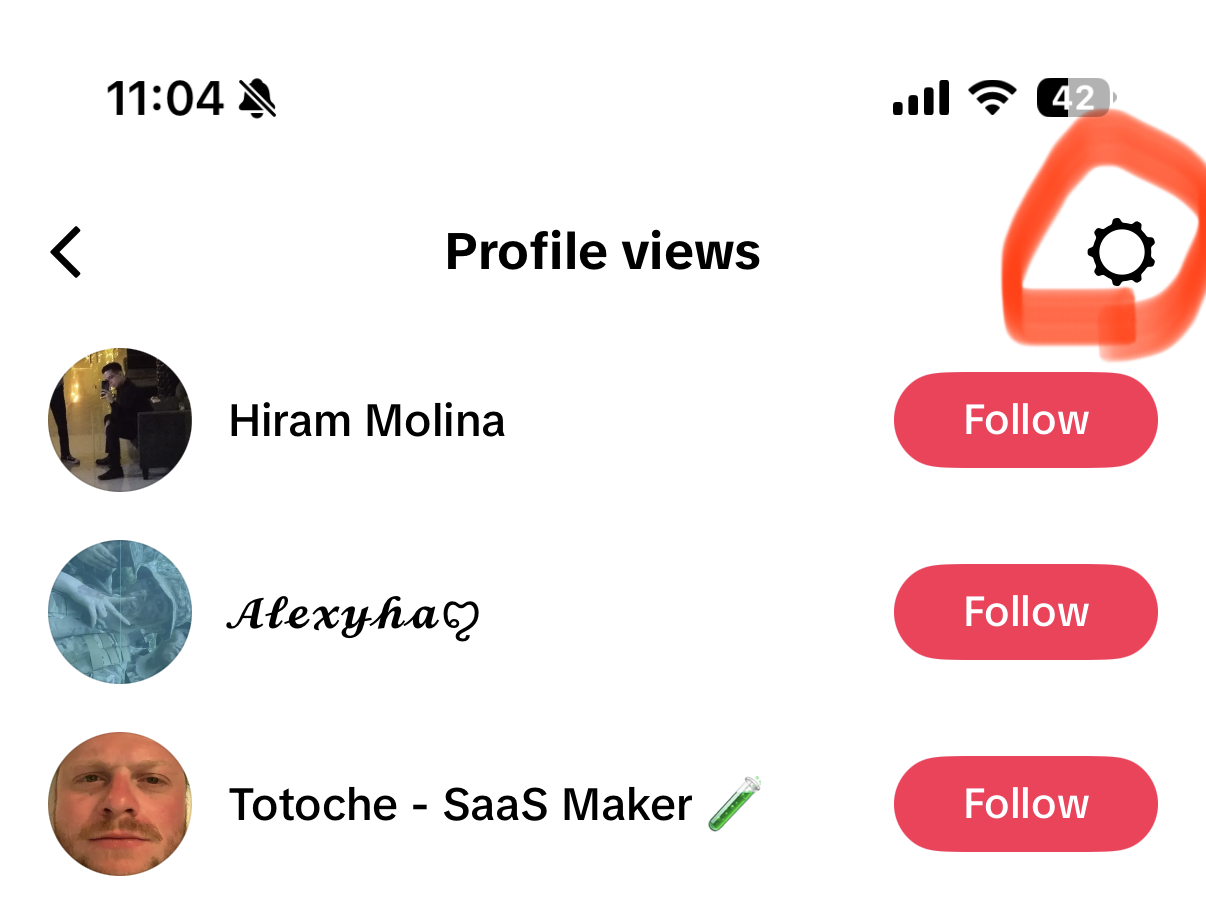
On the Profile views screen, tap the gear icon in the top-right corner.
-
Toggle Viewer history off.
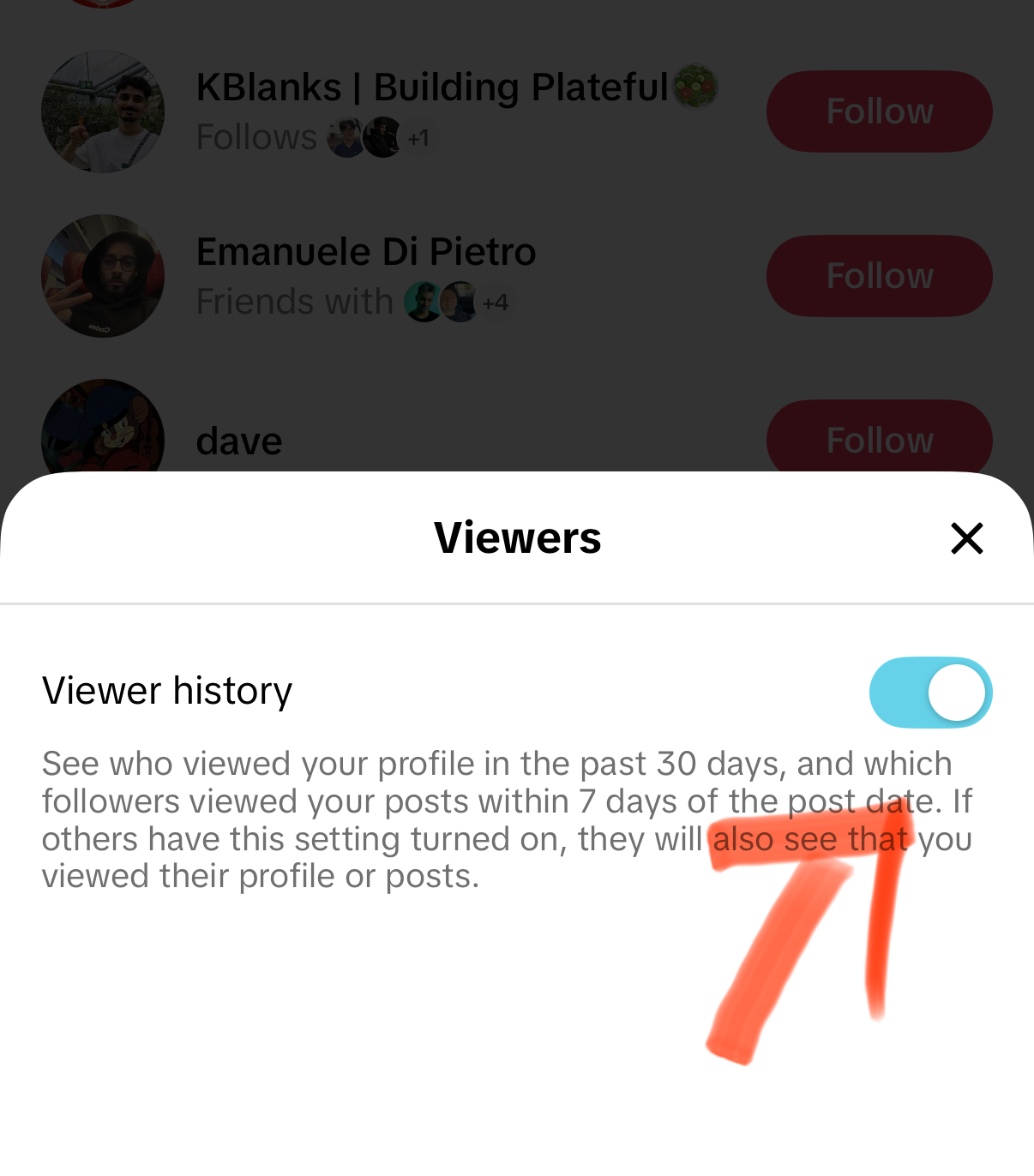
Once the toggle is off, TikTok will stop showing your profile view list. You can turn it back on later from the same screen.
Method 2: Turn Off Profile Views From Settings and Privacy
Use this path if you do not want to open the Profile views list first.
-
Open TikTok and tap Profile.
-
Tap the Menu icon, the three lines in the top-right corner.
-
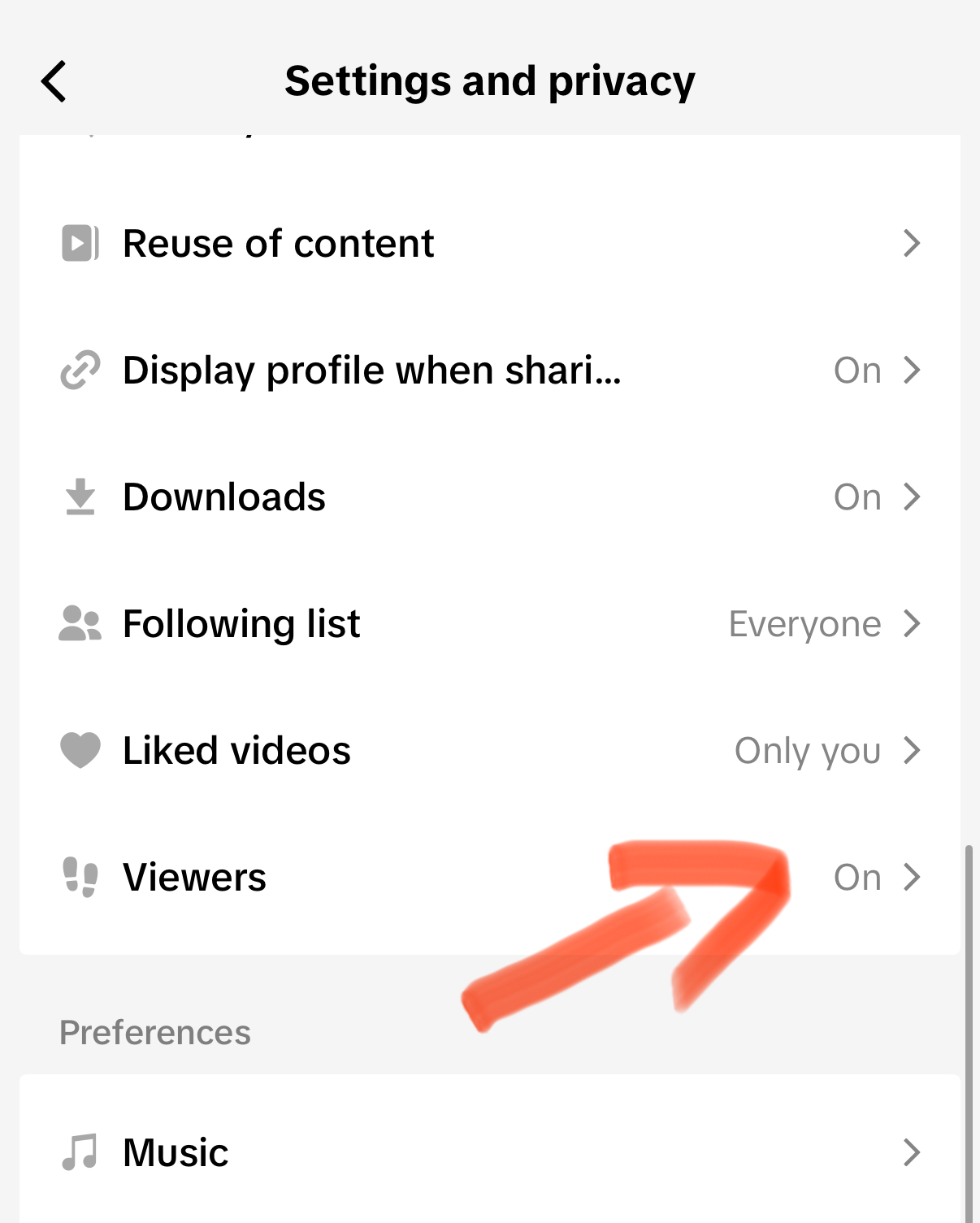
Tap Settings and privacy.
-
Tap Privacy.
-
Scroll down to Viewers and tap it.
-
Toggle Viewer history off.
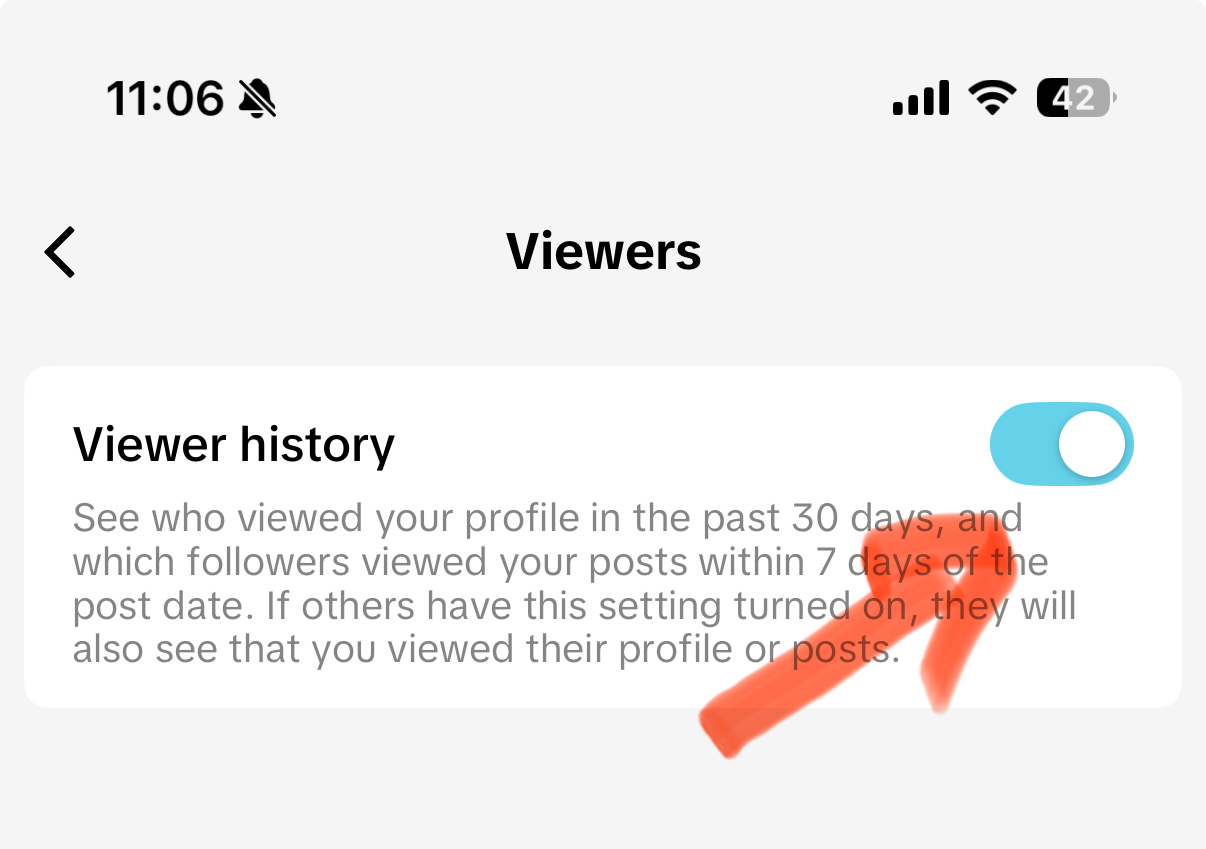
This is the same setting as Method 1, just reached through the full privacy menu. Lifewire's walkthrough of how TikTok profile views work also points users to the profile-view screen and gear icon when disabling it.
What Happens When You Turn Profile Views Off?
Turning off Profile view history changes two things:
- You cannot see who viewed your profile. Your viewer list disappears while the feature is off.
- Other people should not see your profile visits through Profile view history. The feature is reciprocal, so opting out removes you from that visibility loop.
It does not make your whole TikTok account private. People may still see your videos, public comments, likes, reposts, follow activity, and profile if your account is public. If a specific person is the issue, blocking them on TikTok is stronger than turning off profile views.
Will Someone Know I Viewed Their TikTok Profile?
They can only see your profile visit if all of these are true:
- Your Profile view history was on when you viewed them.
- Their Profile view history was on too.
- The view happened within TikTok's profile-view window, commonly shown as the last 30 days.
- Both accounts are eligible for the feature.
TikTok does not send a normal push notification that says you viewed someone's profile. The visibility lives inside the Profile views screen. That distinction matters: it is not a loud alert, but it can still be seen by someone checking their viewer list.
This is also the core confusion in community threads. Reddit users regularly ask versions of "can they see I viewed them?" in TikTok help forums and search results, but those answers are anecdotal. Use the official setting as the source of truth, and treat Reddit discussions about TikTok profile view history as useful for spotting common confusion, not as policy.
Does Turning It Off Remove a Past View?
Do not rely on it as an undo button.
If you viewed someone while both accounts had Profile view history enabled, there is a chance your visit was already visible. Turning the setting off is still the right move for future browsing, but if the situation is sensitive, assume the earlier view may have been seen.
For future privacy, turn the setting off before viewing profiles.
Why You Might Not See the Viewers Setting
If Viewers or the profile Viewers icon is missing, it is usually one of these:
- Your TikTok app needs an update.
- Your account is not eligible for the feature.
- The feature is unavailable in your region or account type.
- TikTok is testing a different layout on your account.
- You are looking on desktop, where TikTok privacy settings are more limited.
Profile view history has also historically been limited by age and follower count. Lifewire notes that users may be unable to access it if they are under 16 or have 5,000+ followers. TikTok can change eligibility rules, so if the button is missing, update the app first, then check again from the mobile app rather than desktop.
If TikTok settings are behaving strangely after an update, clearing cache can help. Use the safe in-app method in our TikTok cache guide, and avoid clearing app data if you have local drafts you care about.
Profile Views vs Post View History
TikTok has two similarly named settings, and they are easy to mix up:
| Setting | What it affects | Why it matters |
|---|---|---|
| Profile view history | Whether eligible users can see profile visits | Controls whether your profile visits participate in the viewer list |
| Post view history | Whether people can see that you watched their posts in certain contexts | Separate from profile visits |
If your goal is "do not show that I looked at their profile," turn off Viewer history. If your goal is "do not show that I watched a specific post," check TikTok's separate official page for Post view history.
Should Creators Leave Profile Views On?
For casual personal accounts, turning it off is usually the easiest privacy win.
For creators, it depends. Profile views can reveal warm leads: people checking your page after watching a video, clicking your bio, or considering a follow. If you use TikTok for growth, profile visits are a small signal that your content is driving curiosity. In that case, you may want to leave it on while you are actively tracking content performance, then turn it off when browsing privately.
If you are optimizing your creator profile, also make sure your bio and link are doing real work. See how to add a link to your TikTok bio if your profile traffic is not converting.
Better Privacy Settings to Pair With It
Turning off profile views is only one privacy control. If you want a quieter account overall, pair it with these:
- Private account: Settings and privacy -> Privacy -> Private account. This limits your videos to approved followers.
- Blocked accounts: Block people who should not see or interact with you. Start with how to block someone on TikTok.
- Suggested account controls: Review whether TikTok can suggest your account to contacts, Facebook friends, mutual connections, and people who open links you share.
- Comment and mention limits: Restrict who can comment, mention, tag, Duet, or Stitch your content.
- Saved content hygiene: If you are cleaning up your activity, see how to see saved videos on TikTok and remove anything you do not want tied to your account behavior.
If you are done with the account entirely, profile-view settings are not enough. Read how to delete your TikTok account before deleting, especially if you need to save drafts, downloads, or account data first.
Common Questions
Can I turn profile views back on later? Yes. Go back to Viewers and switch Viewer history on again.
Will I appear in someone's profile views if mine is off? You should not participate in Profile view history while your setting is off. For sensitive situations, turn it off before viewing profiles rather than after.
Does TikTok notify people when I view their profile? No standard notification is sent. If Profile view history is enabled for both accounts, they may see you inside their viewer list.
Can I see who viewed my profile while mine is off? No. Turning it off removes your access to the viewer list.
Does a private account hide profile views? A private account controls who can follow and view your content. It is stronger than Profile view history for content privacy, but you should still turn Profile view history off if you do not want profile visits visible.
Can I turn off profile views on desktop? Use the mobile app. I do not see a dependable PC/desktop path for this setting, and TikTok's desktop settings are more limited than the phone app.
The Bottom Line
To turn off profile views on TikTok:
Fast way: Profile -> Viewers icon -> gear icon -> Viewer history off.
Settings way: Profile -> Menu (three lines) -> Settings and privacy -> Privacy -> Viewers -> Viewer history off.
That stops you from seeing your own profile-view list, and it should stop other eligible users from seeing your profile visits through that same feature. For stronger privacy, combine it with blocking, a private account, and tighter comment, mention, Duet, and Stitch controls.
For more TikTok account control, see how to clear TikTok cache, how to block someone on TikTok, how to change TikTok account region, how to repost on TikTok, and where to find TikTok drafts.
Running TikTok as a creator instead of just browsing? Genviral's TikTok Scheduler helps you plan, schedule, and publish TikTok content from your desktop while keeping the messy mobile-app work to a minimum.

Viktor
Occasional writer, sometimes even funny. Also loves to start conmpanies (weird, I know).


