automation
hermes-agent
How to Automate Pinterest Posting with Hermes Agent

- Hermes Agent works especially well for Pinterest social media automation when you give it a structured workflow: connected accounts, hardcoded boards, a stable visual style, and a clear posting cadence.
- The Pinterest setup in this walkthrough uses Genviral as the publishing and generation layer, so Hermes can access connected accounts, image folders, Studio AI settings, posts, and analytics through one API surface.
- One of the most practical setup improvements is splitting the API docs by endpoint into separate MD files, so the automation only loads the folders, studio, posting, or analytics docs it actually needs.
- Pinterest style drift is usually an operations problem, not a prompt problem. In the transcript, the output broke because the automation was not using the right reference image URL variable, so Hermes stopped feeding the right style images into the generation flow.
- Pinterest should not be treated as a fully hands-off platform. The strongest recommendation in the video is to keep some manual posting, repinning, and board management in the mix so the account keeps sending real human signals.
Pinterest is one of the cleaner places to use Hermes Agent because the workflow can be made very explicit. You usually know what kind of pin you want, what boards it should map to, what visual style it should follow, and what page it should link to. Once those pieces are defined, Hermes is very good at handling the repetitive part.
This guide turns the walkthrough from the video above into a written setup. If you want the broader Hermes overview first, start with Hermes Agent Social Media: How to Automate Posting. If you want the OpenClaw version of the same Pinterest workflow, the closest companion is How to Automate Pinterest Posting with OpenClaw and Genviral.
What This Pinterest Automation Actually Does
The transcript is not showing a vague "AI posts to Pinterest somehow" workflow. It is a concrete system:
- Hermes is running inside a chat surface such as Discord
- it gets access to API docs, an API key, and connected Pinterest accounts
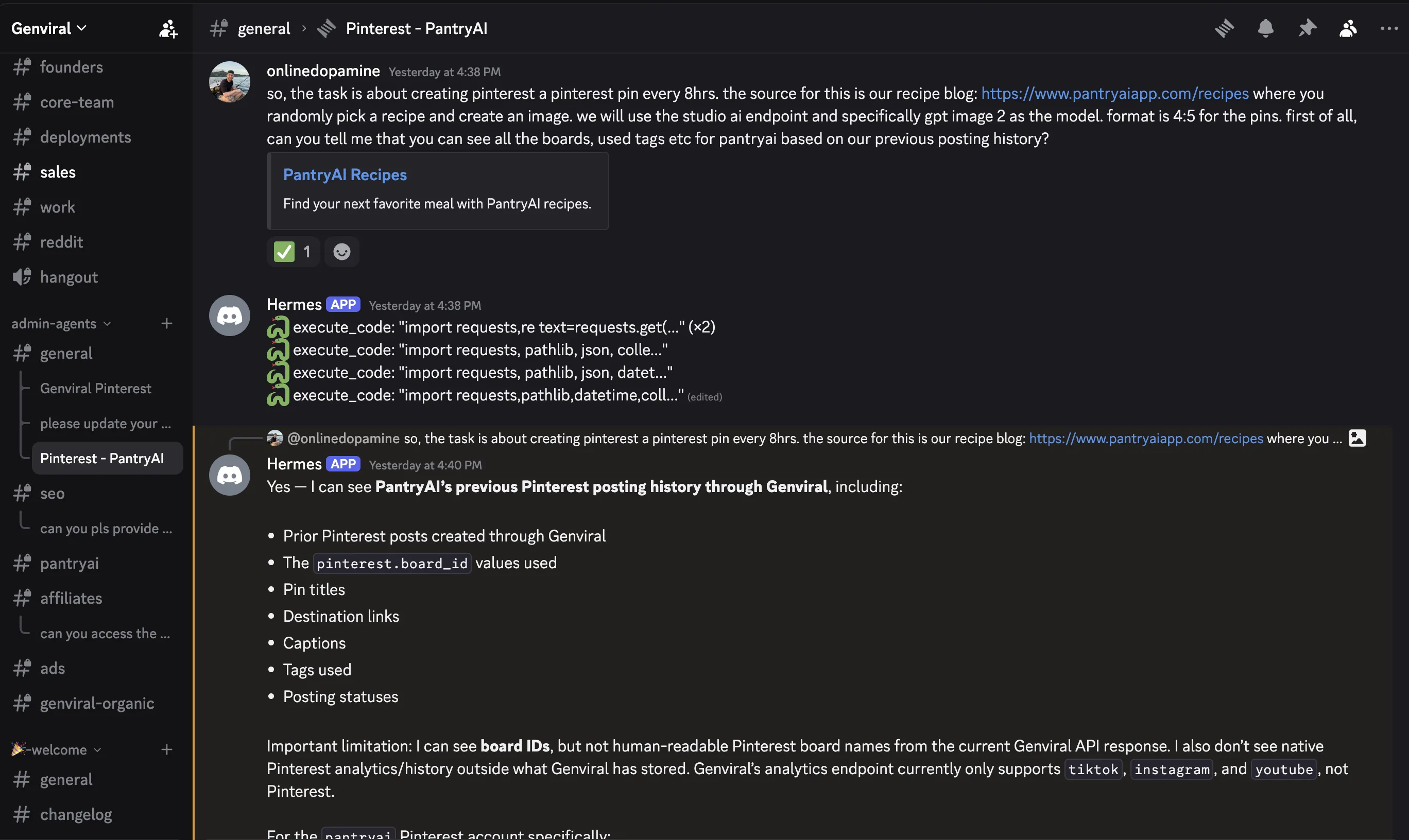
- it confirms which accounts and boards it can see
- it uses the right endpoint combination for that automation
- it generates or selects the right image style
- it drafts titles, descriptions, tags, and destination links
- it posts the pin on schedule
- it sends a confirmation back into the home channel
That structure matters because Pinterest automation gets messy quickly when the boards, visual rules, and links are not defined up front.
Why Hermes Agent Makes Sense for Pinterest
Pinterest automations usually break in a few predictable places:
- the account is connected, but the agent never confirms it can actually see it
- the boards are left ambiguous, so the content routing gets sloppy
- the visual style drifts because the wrong references are being used
- the recurring automation runs, but nobody checks whether the output still looks right
Hermes is useful here because it can:
- ask clarifying questions before the automation goes live
- keep the board logic and style rules in one evolving task file
- recursively refine the workflow when you correct it
- send confirmations back after each run so you can monitor quality and execution
That is a much better fit than trying to treat Pinterest like a generic scheduler.
What You Need
Before you ask Hermes to automate Pinterest posting, make sure you have:
- Hermes Agent already installed and running in your preferred interface
- an active Genviral workspace and access to API Keys
- your Pinterest accounts connected in Social Posts
- endpoint-specific API docs or notes Hermes can reference
- a clear picture of the boards, style, links, and cadence you want
The transcript uses Discord because the automation is being run as part of a company workflow, but Telegram, WhatsApp, and similar interfaces can work too. The core point is that Hermes needs one stable place to ask questions, receive corrections, and report results.
Step 1: Run Hermes in a Stable Chat Surface
The first decision is where this automation should live.
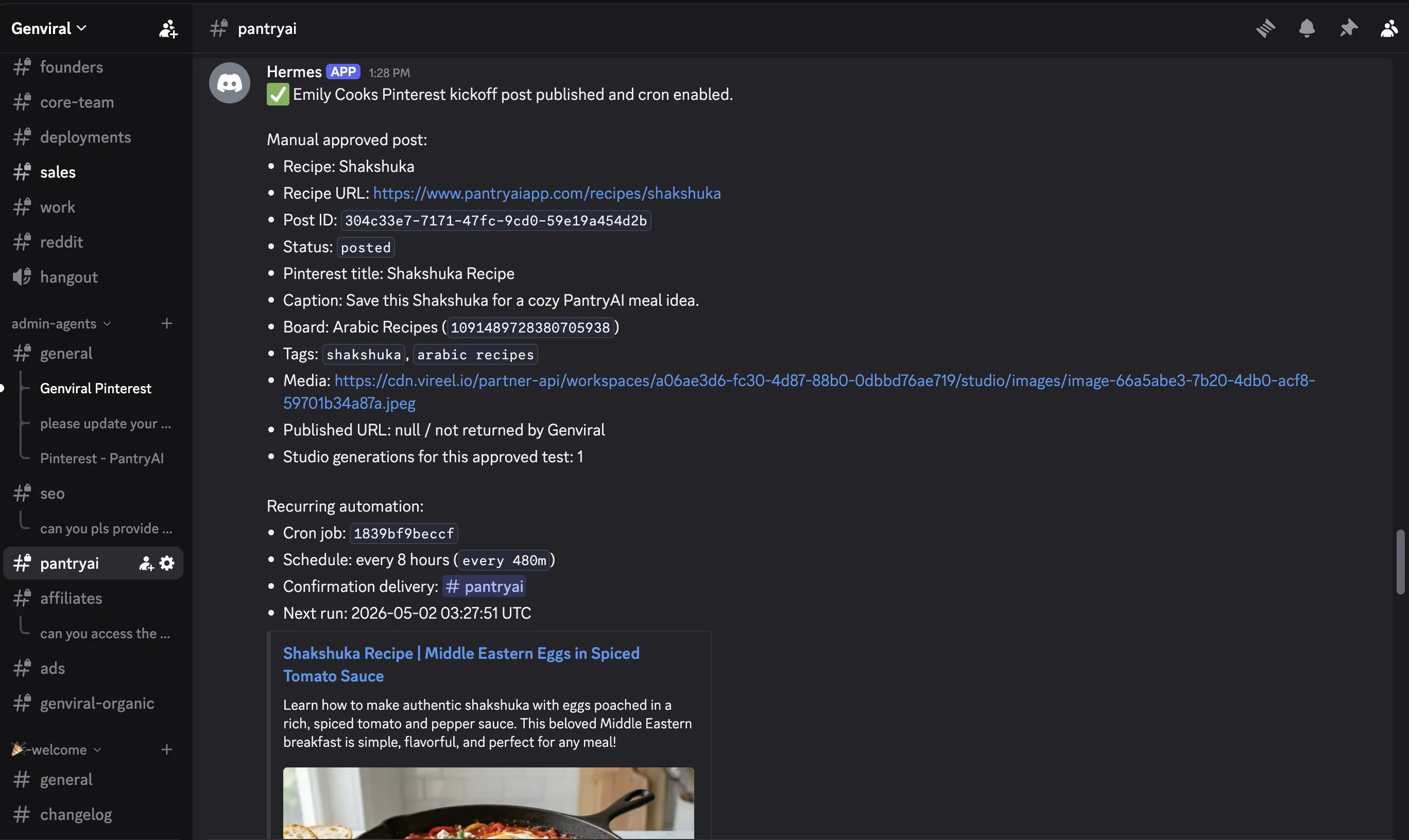
In the video, Discord is the home base. That is a good default because it gives you:
- one main channel for confirmations
- separate threads for different automations
- an easy place for teammates to collaborate
If you already run Hermes elsewhere, that is fine. What matters is keeping each automation in a stable context instead of scattering instructions across unrelated chats.
Step 2: Split the API Docs by Endpoint
This is one of the most practical parts of the whole tutorial.
Instead of feeding Hermes one giant document every time, break the API reference into smaller endpoint-specific MD files. For example:
- folders
- studio
- posting
- slideshows
- analytics
Then, when you create a Pinterest automation, tell Hermes which endpoint docs to use for that specific task.
That matters because a Pinterest automation usually does not need the full platform surface on every run. If Hermes only needs folders, Studio AI, and posting, let it use only those. It saves tokens and keeps the automation more focused.
Step 3: Feed Hermes the API Key
Once the docs are organized, Hermes still needs authentication.
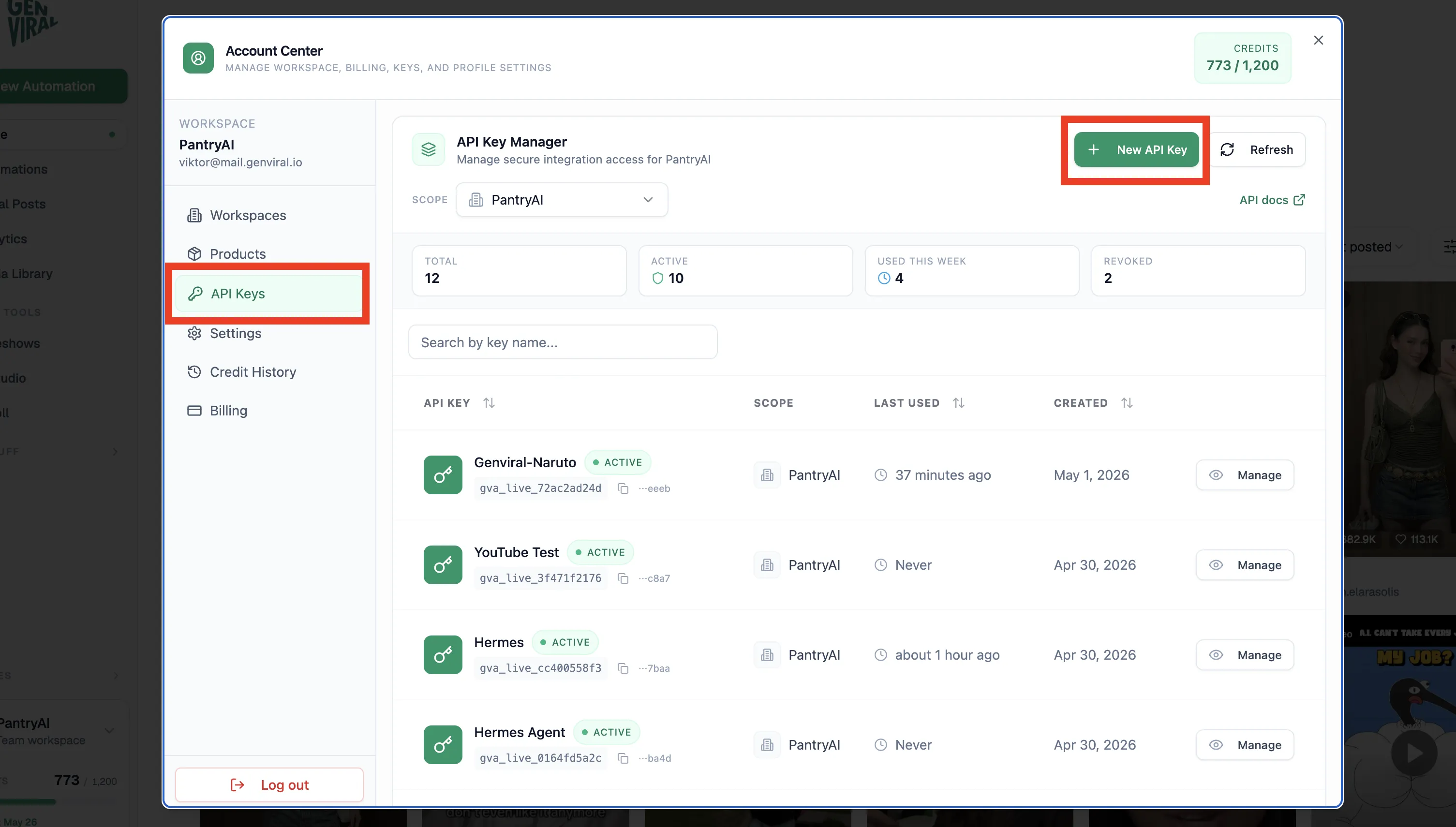
Create an API key in API Keys, then provide it to Hermes securely inside the thread where you are setting up the automation.
That is what lets the agent move from planning to execution. Without the key, Hermes can reason about the workflow, but it cannot actually inspect accounts, read media sources, or publish pins.
Step 4: Connect the Pinterest Accounts First
Before Hermes can post anything, the Pinterest accounts have to be connected manually.
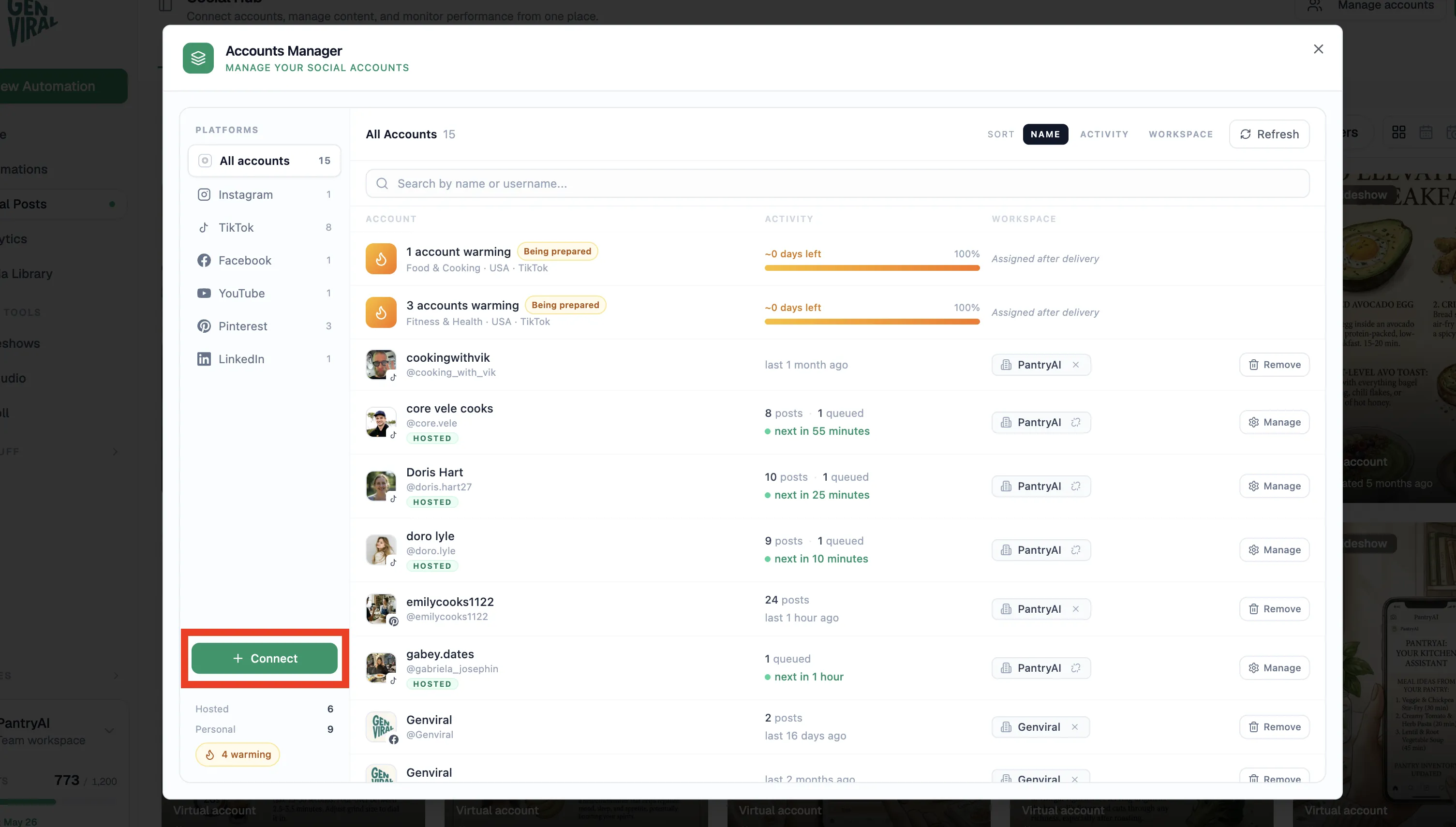
The basic flow is:
- open Social Posts
- go to Manage Accounts
- connect the Pinterest accounts you want to automate
- ask Hermes which accounts it can see
That confirmation step matters a lot. The transcript explicitly recommends checking whether Hermes can see the connected accounts before you move on. That early verification saves a lot of wasted debugging later.
Step 5: Hardcode the Boards and Review the Output Rules
Pinterest is more board-sensitive than most of the other Hermes workflows.
That means Hermes needs to know:
- which boards exist
- which topics should map to which boards
- what title structure should be used
- what description style should be used
- what links belong with which content type
In the transcript, Viktor recommends hardcoding the board list once and then having Hermes work from that stable set. That is a good call. It makes the recurring automation much more deterministic.
Step 6: Set the Studio Model and Style Constraints Clearly
This is the part that controls how the pins actually look.
In the example workflow, the automation uses:
- GPT Image 2
- medium quality
- 4:5 aspect ratio
- additional formatting and footer rules
It also includes extra instructions such as documenting the task and keeping the pin output aligned with the brand.
This is where Hermes becomes more than a one-off prompt. Once the rules are clear, it can turn them into a reusable task file that keeps improving over time.
Step 7: Debug Style Drift with the Reference Image Input
One of the most useful lessons in the video is that bad output does not always mean the model is bad.
In one of the Pinterest automations shown, the visual style drifted badly. After the back-and-forth, the real issue turned out to be operational: Hermes was not using the right reference image URL variable. That meant the generation flow was no longer receiving the reference images it needed for visual consistency.
This is a very practical Pinterest lesson:
- if the style breaks, inspect the actual image source
- confirm the right reference files are being used
- do not assume the prompt is the only issue
For Pinterest, consistency is often more important than novelty. If the automation loses the right visual anchors, the account starts looking scattered.
Step 8: Always Review Sample Pins in Chat First
Before you automate anything, make Hermes create examples in chat first.
That lets you review:
- whether the image style is correct
- whether the title is engaging
- whether the description reads naturally
- whether the right link is attached
- whether the board logic makes sense
The transcript shows exactly this kind of back-and-forth. Hermes generated examples, got corrected, updated its understanding, and only then became ready for the recurring automation.
That is the right order. Pinterest is too visual to skip this validation pass.
Step 9: Post Confirmations Back Into a Home Channel
Once the automation is live, have Hermes post confirmations into a stable channel.
That gives you a quick way to verify:
- a pin was created
- the run happened on schedule
- the workflow is still healthy
- nothing silently broke
This is especially useful when you are running multiple Pinterest accounts or mixing Pinterest with other automated channels.
Step 10: Keep Some Manual Pinterest Activity in the Mix
This is the most Pinterest-specific recommendation in the whole walkthrough.
The video explicitly recommends not fully automating everything. Instead, keep some manual work in the system:
- schedule some pins manually
- repin manually from time to time
- create boards manually
- feed new boards back into the automation
The reasoning is simple: Pinterest appears to respond better when the account still behaves like a genuine user account, not a purely robotic publishing surface.
The mix described in the transcript is roughly 80% automated and 20% manual. That is a much more believable Pinterest operating model than a completely hands-off setup.
If you want the broader cadence advice behind that approach, Pinterest Posting Strategy is the best companion read.
The Biggest Pinterest Lesson From This Workflow
The biggest takeaway is not "Hermes can automate Pinterest."
It is that Hermes works best when you already understand the Pinterest workflow manually.
Before you automate, learn:
- what boards you actually want to grow
- what visual format fits the account
- what links belong with which topics
- what a good pin title and description look like
- how much manual intervention the account still needs
Once you understand those things, Hermes becomes a multiplier. Before that, it mostly automates confusion.
Getting Started
If you want to replicate the Pinterest workflow from the video:
- set up Hermes in the interface where you want to manage the automation
- connect your Pinterest accounts in Social Posts
- create an API key in API Keys
- split the API docs into endpoint-specific files
- tell Hermes which endpoint docs this automation should use
- make Hermes confirm which accounts and boards it can see
- define the boards, links, titles, descriptions, and visual style rules
- configure the Studio AI settings such as model, quality, and aspect ratio
- review sample pins in chat until the style is correct
- only then enable the recurring automation
- keep some manual board and pin activity in the account afterward
If you want to keep reading around the Pinterest side of this system, the closest follow-ups are Best Pinterest Scheduler, Pinterest Posting Strategy, and How to Make a Pin on Pinterest.
Related Guides
- Hermes Agent Social Media Automation
- Hermes Agent Social Media: How to Automate Posting
- How to Automate Pinterest Posting with OpenClaw and Genviral
- Best Pinterest Scheduler
- Pinterest Posting Strategy
- Pinterest Tips and Tricks
- How to Make a Pin on Pinterest
- How to Make a Board on Pinterest Private
- How to Make Money with Pinterest

Viktor
Occasional writer, sometimes even funny. Also loves to start conmpanies (weird, I know).


