claude
automation
growth
social-media
Mobile App Competitor Analysis and Marketing Automation with Claude MCP

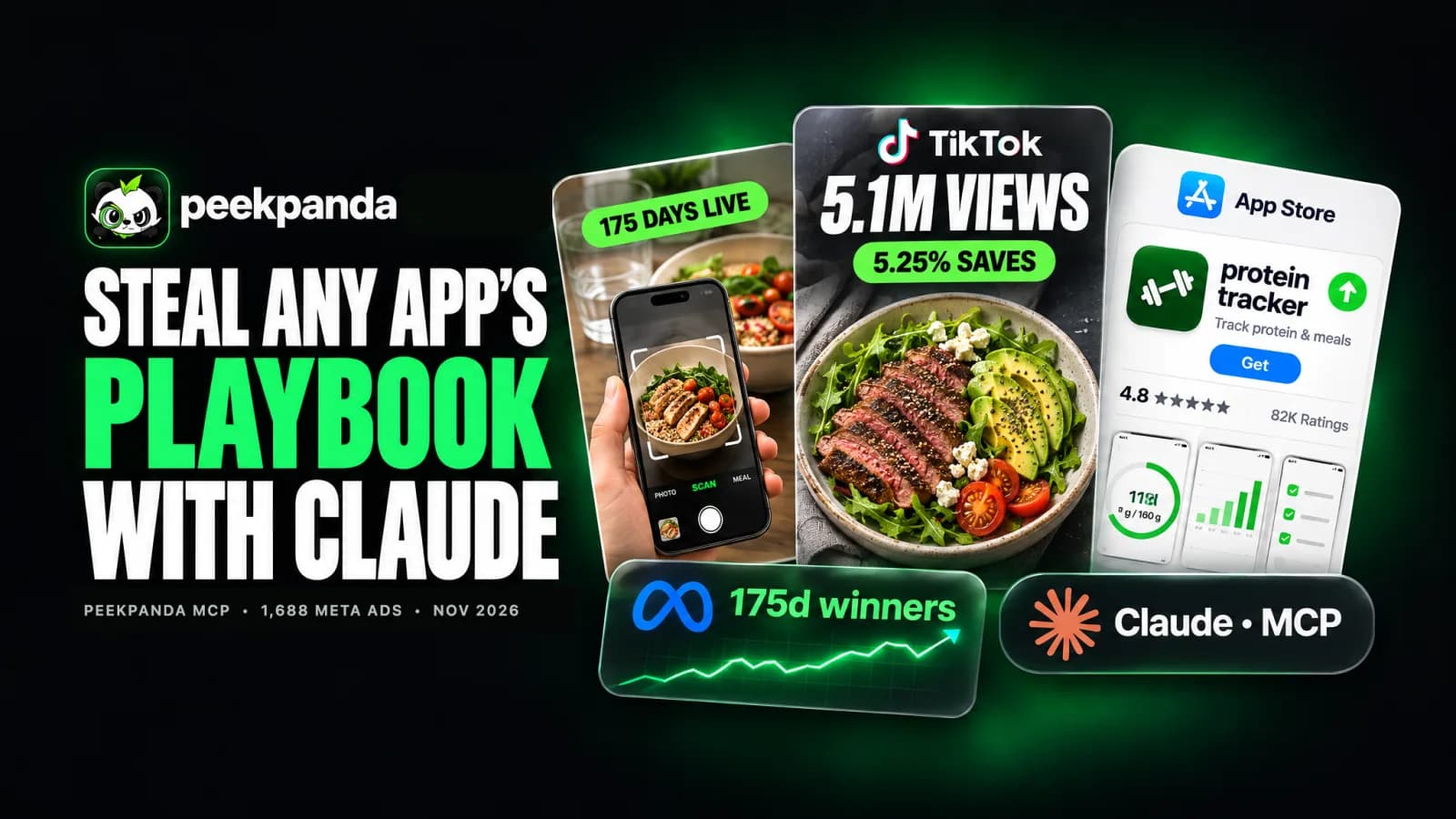
- Connecting PeekPanda MCP and Genviral MCP turns one Claude, Claude Code, or Cursor thread into a complete mobile app competitor analysis and marketing automation workflow.
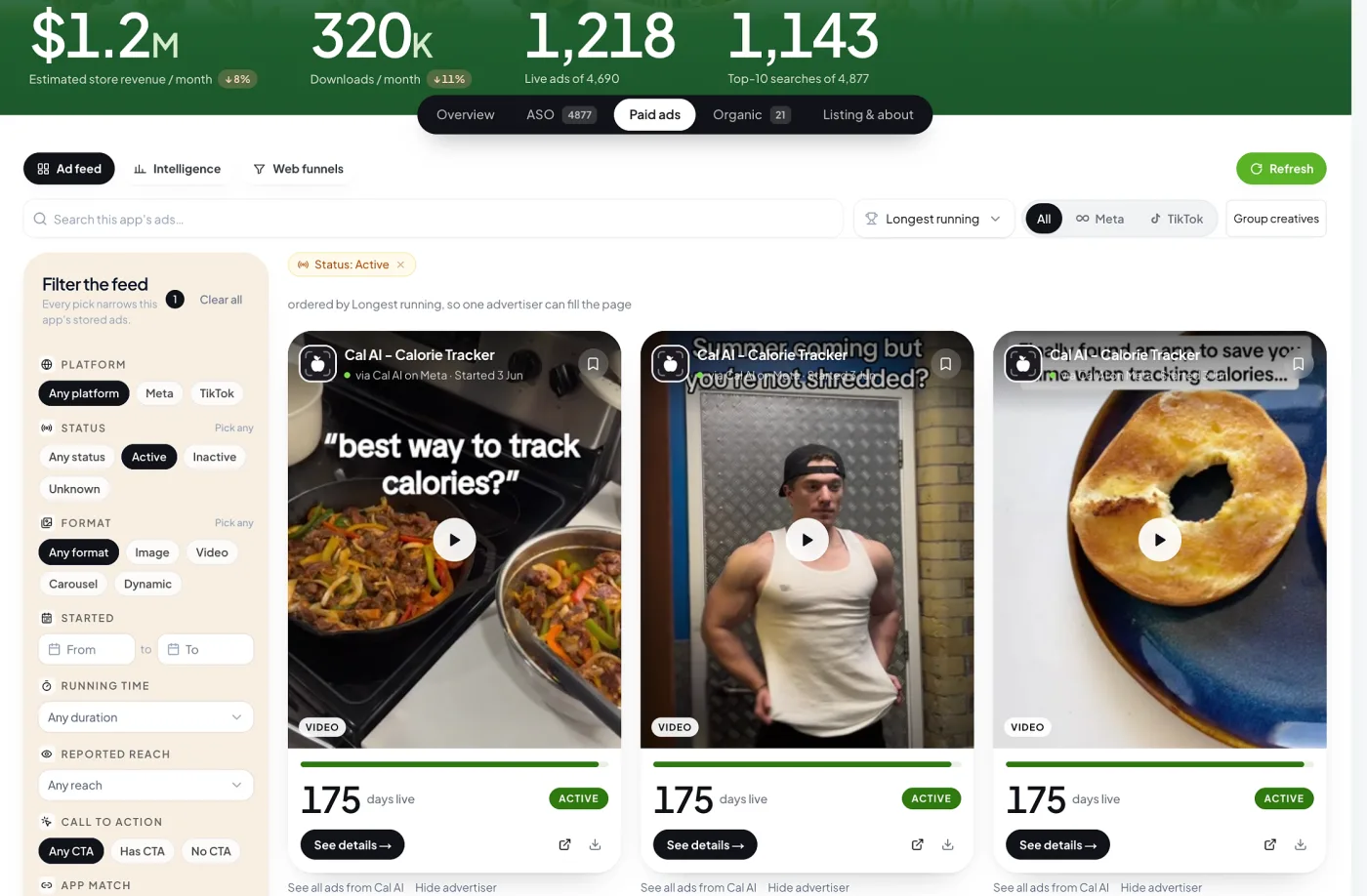
- Manual Meta Ads Library search shows yesterday's tests alongside long-term winners. Filtering by days live separates short experiments from ads a competitor kept paying for, such as Cal AI's five active Meta ads running 175 days straight as of 25 November 2026.
- Across 87 tracked viral TikTok slideshows in the calorie-tracking category (157M combined views), the highest-saving formats (4.2% to 5.25% save rate) lead with lifestyle or meal lists and introduce the app casually on slide 5 or 6.
- US App Store keyword research inside Claude shows why small apps stall on head terms:
calorie trackerhas a median page-one rating count of 126K, whileprotein trackercarries 48 popularity with a 6.3K median and four page-one apps under 300 ratings. - Once research sits in thread context, Genviral MCP stages Week 1 slideshows as drafts via
create_postacross TikTok and Instagram without publishing until you approve.
Building a consumer mobile app is one job. Getting installs every week after launch turns into a second one, and most indie founders end up bouncing between the Meta Ads Library, TikTok search, an App Store keyword tool, a design app, and a scheduling calendar just to get five posts out the door.
The faster pattern is keeping mobile app competitor analysis and mobile app marketing automation inside a single AI conversation using Model Context Protocol (MCP) connectors. When Claude has live read access to competitor ads, organic viral formats, and App Store keywords alongside write access to a publishing layer, every creative brief and scheduled draft pulls from real market numbers instead of generic prompt guesses.
This walkthrough demonstrates the full end-to-end workflow using a concrete example: launching Sona, an example calorie and protein tracking iOS app for women, by auditing Cal AI and its closest competitors with live data captured on 25 November 2026.
Why manual Meta Ads Library search breaks down for app founders
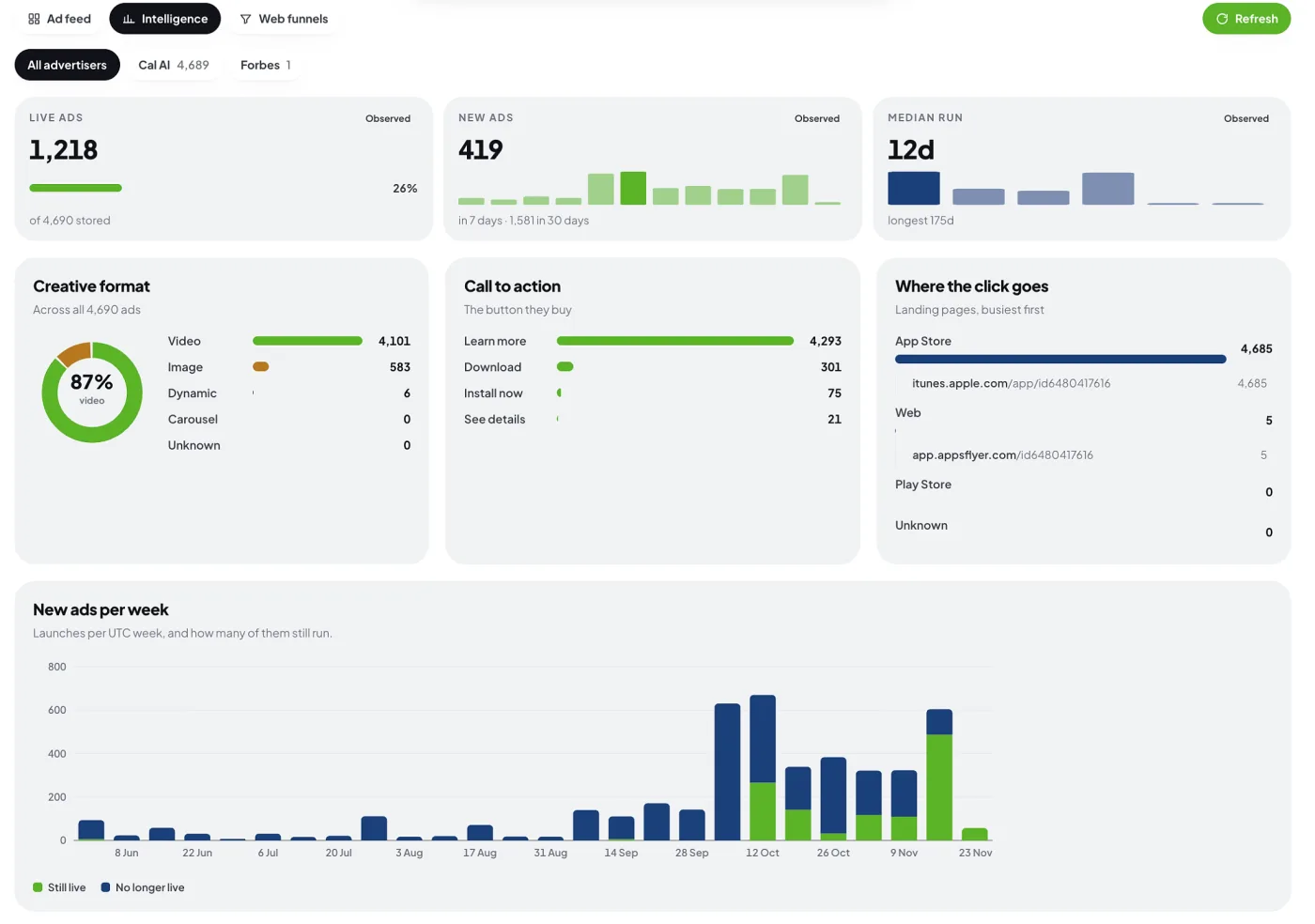
Opening the Meta Ads Library by hand gives you raw volume without survival context. On 25 November 2026, Cal AI had 4,690 Meta ads tracked in total, 1,218 ads live, 1,581 ads launched in the previous 30 days, and 419 new ads launched in the last 7 days alone. Half of those live ads had been running for 12 days or less.
If you scroll a feed like that without filtering by longevity, almost everything you copy is an unvalidated test that the advertiser will turn off next week. Meanwhile, five of Cal AI's active ads had been running continuously since 3 June 2026, 175 days straight. A performance team spending at that scale does not leave five video creatives running for nearly six months unless those hooks keep beating their cost-per-trial target.
The same problem hits organic research and App Store Optimization (ASO). Scrolling TikTok surfaces lucky one-off videos rather than repeatable slideshow templates, and picking App Store keywords by intuition usually puts a brand-new app against incumbents with 130,000 ratings on page one.
Step 1: Connect PeekPanda and Genviral as Claude MCP connectors
To run research and execution inside one thread, you connect two remote HTTP MCP servers:
- PeekPanda MCP (
https://mcp.peekpanda.com/mcp) supplies the research layer. As of 25 November 2026, its live index covers 1,831,508 iOS apps, 7,730,836 Meta ads (1,377,134 live), 1,716,765 US App Store keywords, and 15,000+ tracked viral TikTok and Instagram posts. - Genviral MCP (
https://mcp.genviral.io/mcp) supplies the production and distribution layer: 33 tools across 4 OAuth scopes to generate slideshows and videos, manage media folders, and stage or schedule posts across 10 platforms. Publishing stays locked behind its ownposts:publishOAuth scope until you explicitly enable it.
Claude (web and desktop)
Open Claude, go to Settings > Connectors > Add custom connector, and add both remote endpoints:
- Name:
PeekPanda| URL:https://mcp.peekpanda.com/mcp - Name:
Genviral| URL:https://mcp.genviral.io/mcp
Claude Code
Register both connectors from your terminal, then run /mcp inside Claude Code to finish OAuth sign-in:
claude mcp add --transport http peekpanda https://mcp.peekpanda.com/mcp
claude mcp add --transport http genviral https://mcp.genviral.io/mcp
Cursor
Add both HTTP servers to .cursor/mcp.json in your workspace:
{
  "mcpServers": {
    "peekpanda": {
      "type": "http",
      "url": "https://mcp.peekpanda.com/mcp"
    },
    "genviral": {
      "type": "http",
      "url": "https://mcp.genviral.io/mcp"
    }
  }
}
Keep every prompt below in the same conversation thread. The 30-day plan and Week 1 draft generation at the end depend on the exact numbers, ad hooks, and keywords already pulled into context.
Step 2: Separate active spenders from legacy incumbents
Many mobile apps look impressive on social media while generating $2,000/mo, and many category leaders coast on ten years of brand search while barely testing paid creative. Before analyzing a single ad, filter your category so you only study apps actively buying growth.
Run this first prompt in Claude:
Using PeekPanda, find Cal AI and its closest iOS calorie tracker competitors with live Meta ads and estimated monthly revenue.
Sort by live Meta ads and flag who is growing right now vs coasting on legacy brand search.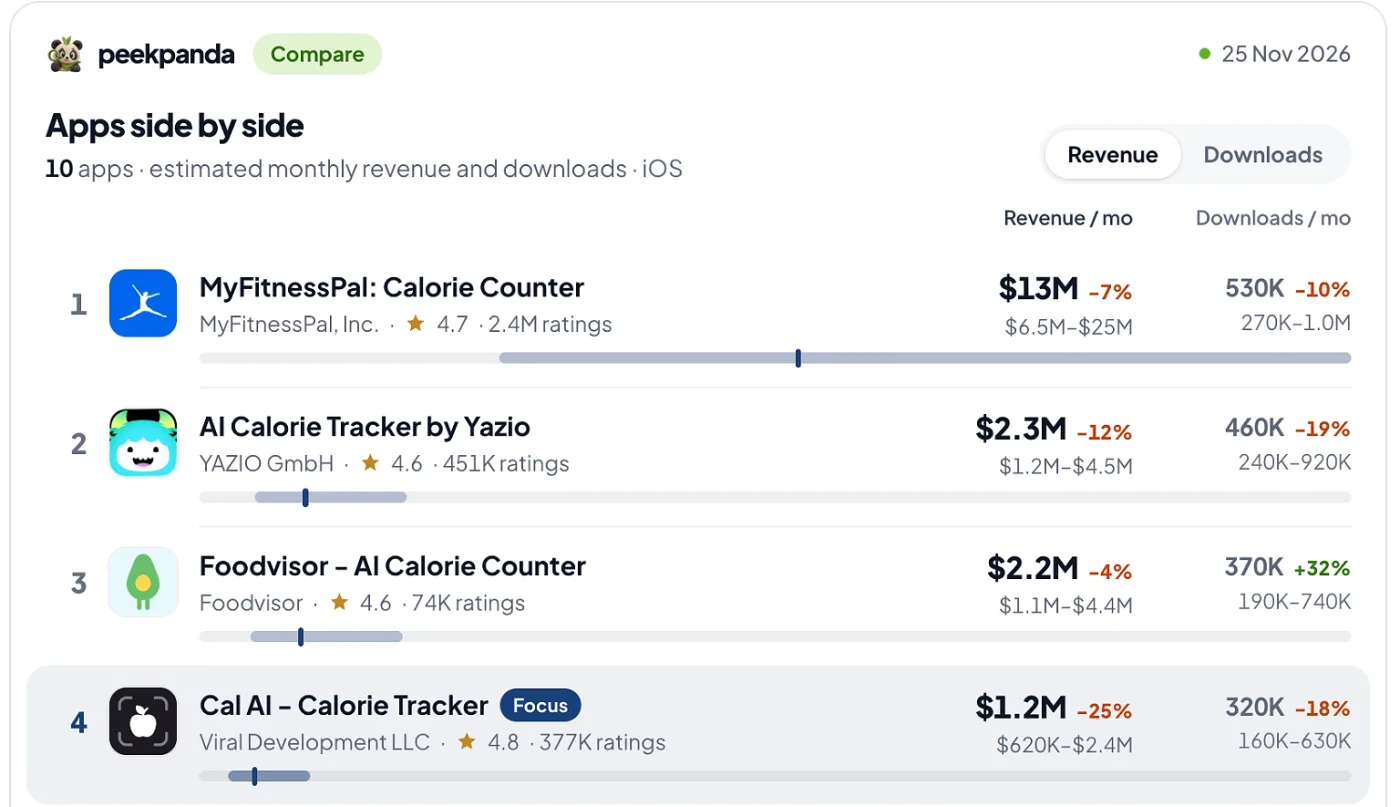
The snapshot captured on 25 November 2026 (with revenue estimates scored on 9 November 2026) splits the iOS calorie-tracker market into three distinct tiers:
| App | Estimated monthly revenue | MoM trend | Live Meta ads | Competitor role |
|---|---|---|---|---|
| MyFitnessPal | $13M/mo ($6.5M to $25M range) | Legacy incumbent | 39 | Coasts on brand search; low ad testing velocity |
| Foodvisor | $2.2M/mo | Established spender | 1,476 | High-volume paid-creative machine |
| Cal AI | $1.2M/mo | Established spender | 1,218 | High-volume video ad tester (87% video) |
| BitePal | $280K/mo | +22% MoM | 537 (27,770 tracked) | Aggressive creative rotator with localized ads |
| FoodPilot | $270K/mo | +170% MoM | Active growth tier | Fast riser worth tracking weekly |
| WiseMeal | $140K/mo | +41% MoM | Active growth tier | Fast riser worth tracking weekly |
Studying MyFitnessPal's 39 live ads will burn an afternoon without teaching you how a newer app acquires paid users today. Studying Foodvisor, Cal AI, BitePal, FoodPilot, and WiseMeal shows which hooks convert cold traffic right now.
Step 3: Pull surviving Meta ads and rewrite the hooks
Once you know which competitors are buying traffic at volume, inspect their launch-versus-survival curve before looking at individual creatives. Most weekly cohorts shut off quickly; the narrow strip of ads still live after 100+ days holds the messaging that actually pays back spend.
Pull the longest-running active creatives straight into Claude:
Show me Cal AI's longest-running live Meta ads with their hooks and creatives.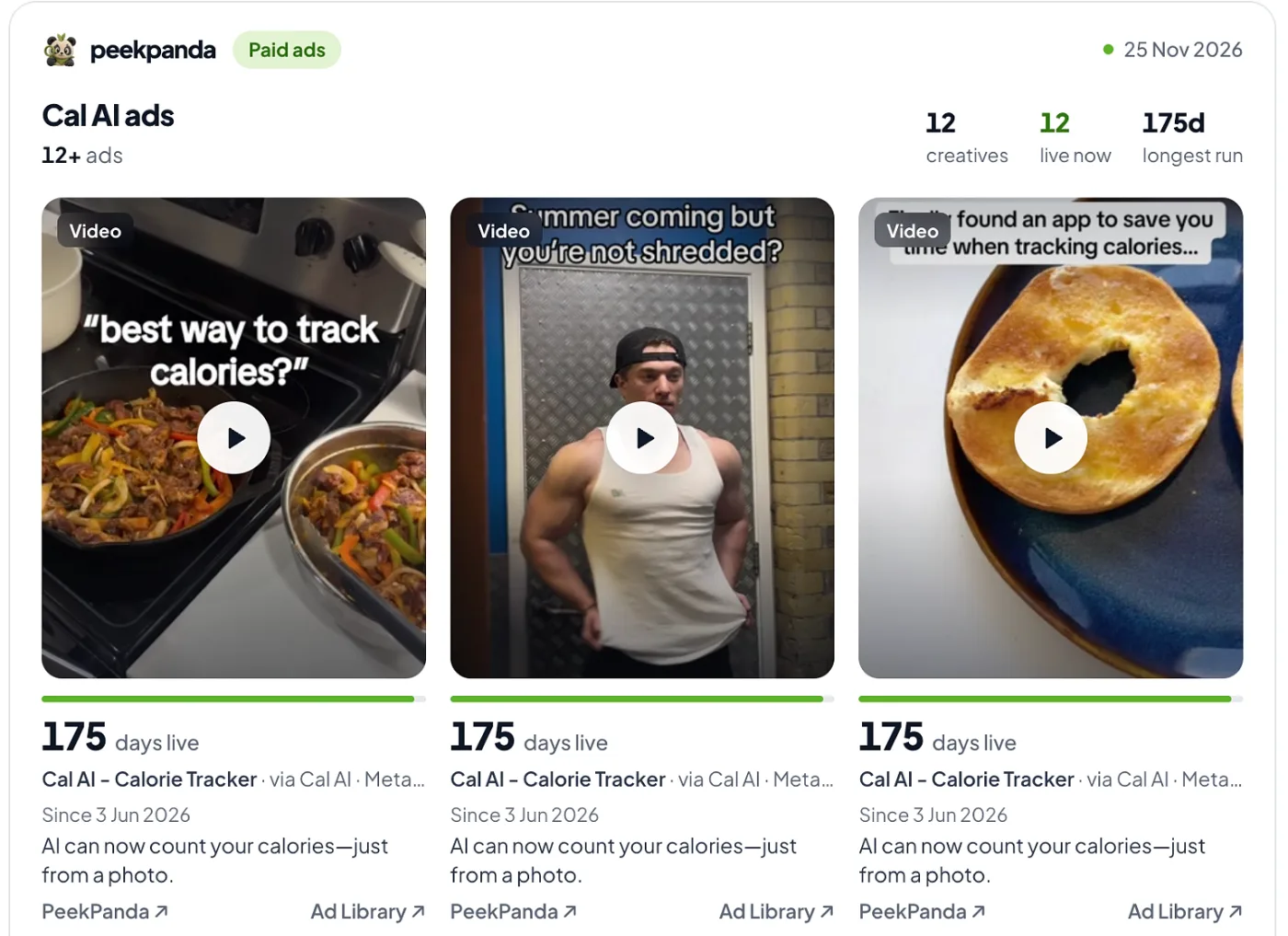
Two patterns jump out immediately from Cal AI's 12 longest-running ads:
- The body copy barely changes. Eleven of the twelve longest-running ads reuse the exact same primary text:
"AI can now count your calories - just from a photo. Cal AI turns your camera into a smart tracker, giving you instant nutritional breakdowns so you can hit your goals without wasting time on manual logging."
- All the creative testing happens in the first two seconds. The visual hooks that survived 175 days call out a daily friction or shortcut immediately:
"best way to track calories?","I eat lunch at my desk... and I still lose weight","Feels like cheating. Track in seconds.", and"Finally found an app to save you time when tracking calories...".
Cross-checking the rest of the category confirms the same underlying pain point. MyFitnessPal's 96-day surviving ad leads with "No more tedious logging or guessing". BitePal's longest survivors (126 days in Portuguese and 117 days in Spanish) sell staying in a calorie deficit without burnout in lower-CPM markets.
Every long-running winner attacks the same moment: weighing ingredients and typing food entries until you give up on day three. Copy the structural hook, not the competitor's video, and adapt it to your own positioning inside the same chat:
Take Cal AI's 175-day visual hooks above ("I eat lunch at my desk and still lose weight", "Feels like cheating. Track in seconds.", "best way to track calories?").
Write 6 UGC hooks and 20-second talking-head scripts for Sona, a calorie and protein tracking iOS app for women.
Rules: open on a daily friction (never the app name), under 14 words for sentence 1, visual beats for 0-3s, 3-10s, 10-16s, 16-20s.
Step 4: Find organic TikTok slideshow formats by save rate
Paid Meta campaigns get expensive quickly when an app is brand new and onboarding is still being tuned. Organic TikTok slideshows let a founder test ten hooks a week without filming or paying $20 CPMs, provided the format is modeled on posts viewers actually bookmark.
Run this prompt next:
What TikTok slideshows went viral for Cal AI and calorie tracker apps? Show the posts with views, bookmarks, and save rates, and name the 3 repeatable formats.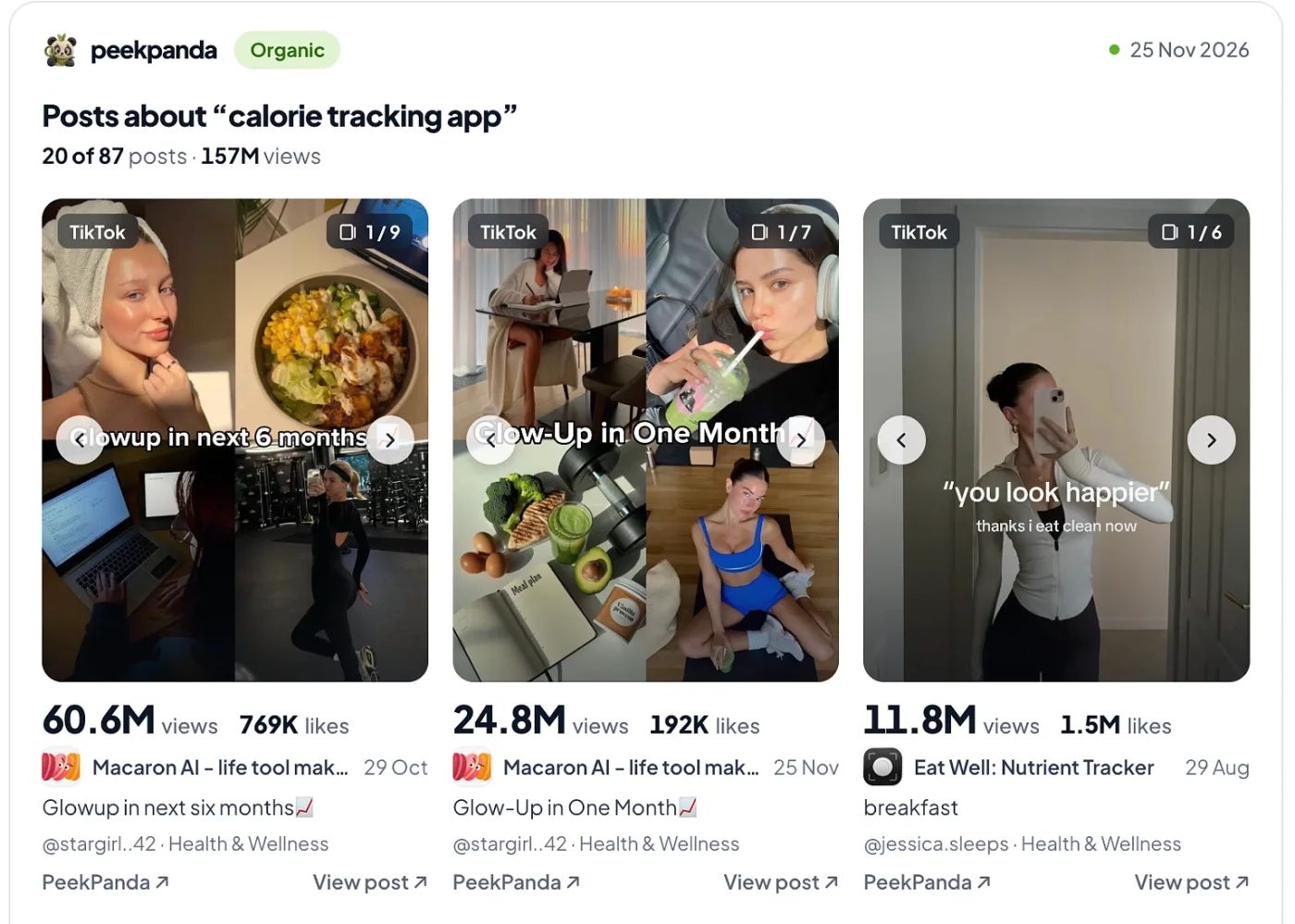
Across 87 tracked posts in this category totaling 157M combined views, the standout slideshows share a clear pattern:
| App | Account | Views | Notable metrics | Opening hook / theme |
|---|---|---|---|---|
| Macaron AI | @stargirl..42 | 60.6M / 24.8M | Two breakout slideshows | "Glowup in next six months" / "Glow-Up in One Month" |
| Eat Well | @jessica.sleeps | 11.8M | 1.5M likes, 490K bookmarks (4.2% save rate) | "you look happier / thanks i eat clean now" |
| ChowTracker | @maddieellisfitnes | 10.8M | High-reach transformation list | "how to become unrecognisable by summer if you start NOW" |
| Clear Food | @ballymaybach | 7.1M | Direct food-rating hook | "this is not healthy.. Sub 5" |
| Cal AI | @nutritionbros_ | 5.1M | 268K bookmarks (5.25% save rate) | "POV: you start to eat like a real human" |
Views alone can mislead you, so watch bookmark rate closely. A 4.2% to 5.25% save rate means people are saving the carousel for their next grocery run or meal prep session. Notice also where the product appears: almost none of these posts open with an app screenshot. The first four slides deliver a useful meal list or routine, and the app enters casually on slide 5 or 6 as the tool that tracks it.
For founders turning these findings into daily posts, Genviral's AI carousel generator and TikTok scheduler handle rendering and queuing the recurring format once a winning hook emerges.
Step 5: Run US App Store keyword research for winnable page-one terms
Paid ads and TikTok spikes stop the day you pause output. App Store search compounds every month, as long as you pick terms where a newer app can realistically break onto page one.
Run this comparison prompt in the same Claude thread:
Compare US App Store keyword popularity, difficulty, and page-one ratings for calorie tracker, macro tracker, protein tracker, and meal planner.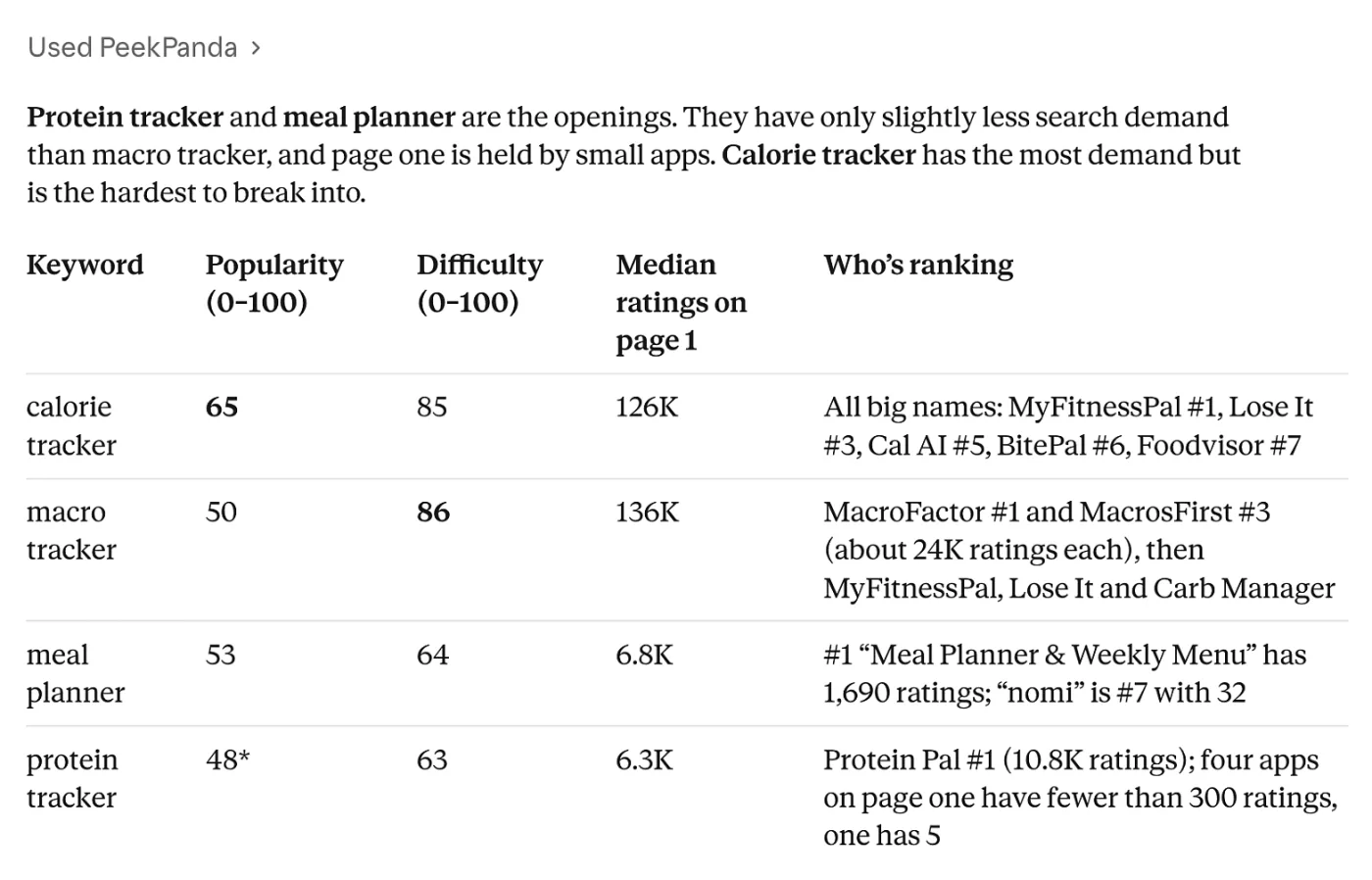
Look at the gap in page-one rating density across four closely related terms:
| US App Store keyword | Popularity | Difficulty | Median page-one ratings | Page-one reality |
|---|---|---|---|---|
calorie tracker | 65 | 85 | 126K | MyFitnessPal at #1, Cal AI at #5 |
macro tracker | 50 | 86 | 136K | MacroFactor at #1; dominated by large incumbents |
meal planner | 53 | 64 | 6.8K | nomi ranks #7 with 32 ratings |
protein tracker | 48 | 63 | 6.3K | Four page-one apps have under 300 ratings; one has 5 |
protein tracker has nearly the same search demand as macro tracker (48 vs 50 popularity), 23 fewer difficulty points, and more than 20x lower median ratings on page one. For Sona, putting Protein Tracker and Meal Planner in the 30-character App Store title and subtitle while placing calorie tracking in the keyword field targets real search volume that a small app can rank for within weeks.
Clean store metadata also helps AI discovery beyond Apple Search. As covered in how to get your app recommended by ChatGPT, consistent naming across your App Store listing, website, and daily social posts gives AI search engines clear facts to cite.
Step 6: Build a 30-day plan and stage Week 1 drafts via Genviral MCP
At this point, your Claude conversation holds competitor revenue tiers, 175-day surviving ad hooks, 4%+ save-rate TikTok slideshow structures, and low-rating US App Store keywords. Turn that context into an executable 30-day plan in one prompt:
I'm launching Sona, a calorie and protein tracking iOS app for women.
Using every competitor receipt, 175-day ad hook, viral slideshow format, and App Store keyword above, build a 30-day week-by-week plan:
- App Store title (30 chars max), subtitle (30 chars max), and 10 target keywords prioritizing "protein tracker" and "meal planner"
- 10 TikTok/IG slideshow concepts modeled on the 4% to 5% save-rate formats
- 3 Meta ad concepts modeled on Cal AI's 175-day hooks
A practical four-week rollout looks like this:
- Week 1: Ship the App Store title and subtitle update targeting
protein trackerandmeal planner, and publish 5 TikTok and Instagram slideshows (one per weekday) to measure which hook earns the highest bookmark rate. - Week 2: Produce 5 variations of your top 2 slideshow hooks, and launch the 3 Meta ad concepts on a controlled daily test budget.
- Week 3: Turn off every ad missing your target cost per trial, matching the fast-kill discipline visible in Cal AI's survival chart, and double daily output on your best-performing slideshow format.
- Week 4: Localize your winning ad hook into Spanish or Portuguese to test lower-CPM markets like BitePal, and replace your two lowest-saving slideshow concepts.
How to schedule social media posts with MCP safely
Once the 30-day plan is ready, you do not need to export text into another tool. Use Genviral MCP in the same thread to generate your first slideshow and stage it as a draft:
Using Genviral:
1. Call get_context to read my connected TikTok and Instagram account IDs.
2. Generate slideshow #1 from Week 1 (6-slide high-protein breakfast carousel, Sona introduced casually on slide 6) with generate_slideshow.
3. Show me the rendered slides.
4. Stage it as a DRAFT for TikTok and Instagram with create_post. Do NOT publish yet.
Because create_post prepares the media and caption without pushing anything live, you can review every rendered slide inside the chat before a single post touches your accounts. Live publishing requires the separate posts:publish OAuth scope and an explicit publish_post call, backed by idempotency keys so retries never double-post.
After reviewing slides 1 through 6 and confirming the visual style, queue the rest of the week in one follow-up message:
Slides 1 and 6 look good. Generate slideshows #2 through #5 in the same style and schedule them one per day at 9am EST starting tomorrow on TikTok and Instagram.If you prefer comparing developer posting stacks before wiring an agent, see the comparison of unified social media APIs or Genviral's social media scheduling overview.
What this workflow does not replace
Automation speeds up research and creative production, but five constraints still apply:
- Revenue estimates are directional, not audited financials. PeekPanda's download and revenue numbers are modeled estimates. They are accurate enough to separate a $2M/mo advertiser from a $30K/mo app and spot momentum, not a substitute for first-party Stripe or App Store Connect data.
- Days live is a proxy, not Ads Manager ROAS. Meta does not publish spend or return on ad spend publicly. Comparing a 12-day median run time against five ads kept live for 175 days is strong public signal, yet only your own ad account proves profitability for your app.
- Coverage is iOS-first and Meta-weighted. Categories that depend exclusively on Android or TikTok paid ads will only show partial paid-media coverage in this setup.
- AI drafts still need a founder read-through. Generating slideshows through Genviral uses monthly credits (credits do not roll over) and produces a fast first draft. Read every opening hook out loud before scheduling.
- Creative volume will not fix a leaky paywall. Faster slideshows and sharper hooks bring more people to your App Store page and onboarding. If activation or trial conversion is broken, higher reach simply reveals the leak faster.
PeekPanda and Genviral MCP execution checklist
If you want to run this workflow on your own mobile app today, both products share one login (Genviral Business and Scale plans include PeekPanda Peek on the same account; check Genviral pricing for plan details):
- Add PeekPanda (
https://mcp.peekpanda.com/mcp) and Genviral MCP (https://mcp.genviral.io/mcp) to Claude, Claude Code, or Cursor. - Pull your category's top 10 iOS competitors sorted by live Meta ads and MoM growth, ignoring legacy giants running fewer than 50 ads.
- Extract the 100+ day surviving Meta ads from the top spenders and rewrite their first-two-second visual hooks around your app's core daily friction.
- Pull viral TikTok slideshows in your category, sort by save rate (aiming for 4%+ structures), and note where the app enters the carousel.
- Audit 4 to 6 candidate US App Store keywords and pick terms with 45+ popularity where median page-one ratings sit near 6K rather than 130K.
- Generate one sample slideshow via Genviral MCP (
get_context,generate_slideshow,create_postas draft), inspect the slides, then schedule the rest of Week 1 across TikTok and Instagram.
Prefer working in a browser instead of MCP? You can run the exact same research-to-publishing loop visually across PeekPanda and Genviral's built-in agent, Vira.
Frequently asked questions
Can Claude analyze competitor Meta ads directly?
Not out of the box, because standard web search cannot filter Meta's ad library by longevity, active status, or app-level creative survival curves. Connecting an MCP server like PeekPanda (https://mcp.peekpanda.com/mcp) gives Claude direct access to structured Meta ad records, run durations, and playable creatives inside the chat.
Does connecting Genviral MCP let Claude publish to TikTok without approval?
No. Genviral separates permissions across 4 OAuth scopes. You can keep posts:publish disabled while letting Claude call get_context, generate_slideshow, and create_post to stage drafts for review, then approve or schedule posts only when you are ready.
Which AI clients support this mobile app marketing automation setup?
Any client that supports remote HTTP MCP servers works with the exact same URLs and prompts, including Claude web and desktop (via Settings > Connectors), Claude Code (claude mcp add --transport http), Cursor (.cursor/mcp.json), and ChatGPT connectors.
Why track TikTok slideshow save rate instead of raw views?
A single viral slideshow can get millions of passive views from an off-topic meme without driving app downloads. Bookmark rates above 4% show that viewers treat the carousel as a reference they want to revisit, which makes the format far easier to repeat across multiple hooks and accounts.

Fekri
Builder, founder, father